
How it works
From getting set up to your first notice
Contract Status runs in a web browser, so there is nothing to install. Your account is set up with us after a demo, and then the app takes you through it, one job at a time. Each step says what to do and why, with an example in every box and a "What's this?" beside each NEC or app term. You can skip a step or save it for later.
- Your company. One person starts the account: your company details, whether you are a client or a contractor, the terms, and who your administrator will be.
- Your roles. Your administrator checks the standard roles for each side, in plain words. Change them or build your own from a standard one.
- Your contracts and clauses. Tick which NEC contracts you use. Standard clauses in our own plain English are ready for each. Change any of them, or add your own Z clauses.
- Your periods. Check the periods for reply. Every new contract starts from these, and each contract can be different.
- Your projects, companies and people. Add them in place. A company needs only its name to begin with, and a person's role and contracts can be set in one go.
- Your contracts. Choose "Which contract?", then its main Option and X and Y(UK) Options. Start from another contract or a saved set-up if you have one.
- Finish. The last page lists what is set up and what is left, and who does it.
Your first notice
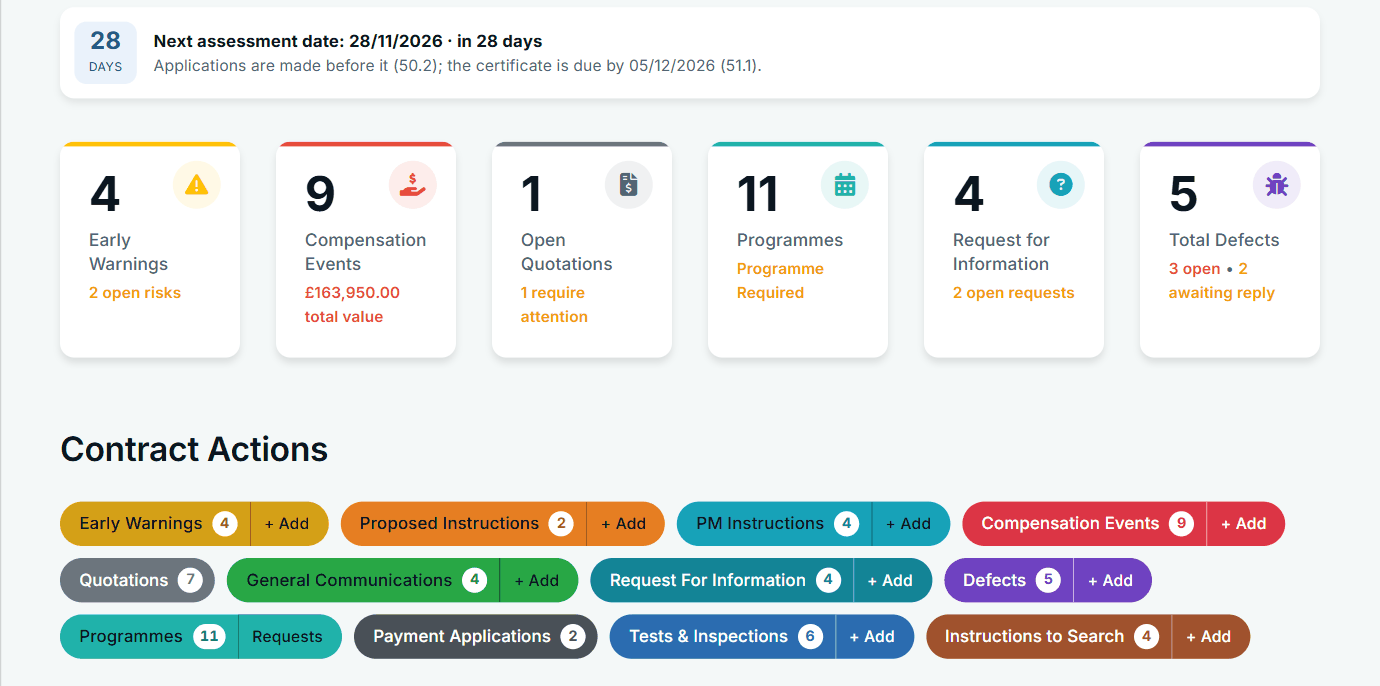
Here is an early warning, from start to finish. Every other register works the same way.
- Add it. On the contract page, under Contract Actions, choose + Add on Early Warnings. Describe the matter and save it as a draft. Only your company sees it, and it already has a reference.
- Submit it. The other side is e-mailed and sees it in the bell, and a notice letter is ready in the Actions menu.
- The reply is due. The date comes from the contract's period (the two weeks on an early warning are a management target, as NEC sets no period for it). It appears on the Action List of the side whose turn it is.
- They reply on the record. You are told. If they do not, it shows as overdue.
- It moves on. Meetings, decisions and actions are recorded on the register, and the record keeps every step: who did what, and when.
Moving a live contract
You do not have to wait for a new contract. Periods keep running while you move, so start by checking what your contract says about communications, set a clear date, and load only what can still cost you something. Our guide on moving a live NEC contract onto software gives the order of work.
What it does for you, and what it leaves to you
It works out the dates, tells the right people, and keeps the history. It does not decide whether an event is a compensation event, who caused it or what it is worth. It does not give notice that a reply is late on your behalf: that stays your choice. And anything that happens outside the app is not on record until someone puts it on the right register.
See how it would work for you
We can talk through set-up for your forms, roles and existing contracts during a demo.