
See it working
Each page here takes a question people really ask on an NEC contract, sets out the contract position in plain English, then shows how you would handle it in Contract Status, screen by screen.
Every screen is from the upgraded app, using a fictional water company, Kestrel Valley Water, and its made-up contractors. Where the app stops and your judgement starts, the page says so. Contract Status records what the two sides did and when; it does not decide who is right.
Contractor side
If you are the Contractor
Warning, notifying, quoting and keeping your position when replies are late.
Early warnings and compensation events
IFC drawings are late: warn first, then notify
Warn now, then notify the compensation event separately with the date you became aware.
Compensation events
The Project Manager has not replied to my notification
Give notice that the reply is late, watch the two weeks, then record deemed acceptance.
Compensation events
Keeping inside the eight-week time bar
Record the date you became aware. The record shows how long you took, and says so if it passed eight weeks.
Quotations
My quotation is waiting for a reply
The reply date is on the record. Give notice, then record deemed acceptance when the time is up.
Compensation events
Exceptional weather: notifying the event
Put the recorded figure and the one-in-ten value on the notification, with the clause and the date.
Compensation events
Unexpected ground conditions
Warn, notify under 60.1(12), then follow it to the quotation or the Project Manager's assessment.
Compensation events
A service that isn't on the drawings
Record what you found, when you knew and the clause, then quote on the event.
Programme
My programme has not been accepted
Read the reason on the record, answer the revised programme request and keep the trail.
Payment
The payment certificate came in lower than we applied for
See applied against certified, ask for the reasons in writing, and get the next application in on time.
Defects
The Supervisor has notified a Defect
Reply on the record with the fault, cause and action, or say why you disagree.
Communications
My RFI hasn't been answered
The RFI shows Overdue and whose move it is. If it matters, raise it on the right register.
Subcontracts
A subcontractor's notice that affects the main contract
The subcontract has its own register. Passing it up to the main contract is your separate notice.
Compensation events
The Project Manager has rejected my compensation event
The decision and the reason stay on the record, with who replied and when.
Instructions
An instruction came with no compensation event
Follow the instruction, then notify the event yourself and quote the instruction reference.
Instructions
The Project Manager has told us to stop work
The stop is on its own record with its clause. The restart and the event follow it.
Tests and inspections
A test has failed: who pays for the repeat?
The result, the Defect, the repeat and the cost of the repeat are linked on one record.
Early warnings
Nobody has responded to my early warning
Ask for the meeting from the register, then the decisions and actions go on record.
Client side
If you are the Client, Project Manager, Supervisor or PMO
Replying on time, deciding on change and seeing where every contract stands.
Proposed instructions
Getting a price before you instruct
Use a proposed instruction: quote first, then instruct and accept in one step.
Staying on top of replies
What do I owe this week?
My Dashboard and the Action List show what is waiting on you, most urgent first.
Staying on top of replies
We missed a reply. What now?
The record says plainly what has happened, what it means and what to press.
Quotations
The Contractor hasn't given a quotation
When the date passes, the record offers the Project Manager's assessment.
Programme
Reviewing a programme on time
A review list with reply dates, private notes for your team, and the contract's reasons in a list.
Commercial view
What's our exposure on this contract?
The total of the Prices, implemented changes, quotations waiting and open events, per contract and across all.
Oversight
Overseeing several contracts as a PMO
Contract cards, portfolio health, the most urgent deadlines and programme insights.
Records
Who said what, and when?
Activity, history, letters and reports: every step with who and when, on both sides.
Records
Taking over a live contract
Who is on it, where it stands, what is owed and what has happened: all on the contract.
Defects
We instructed a search and found no Defect
The instruction, the findings and the decision are on one record, and the event opens filled in.
Defects
The Contractor hasn't corrected a Defect
Record it as corrected by others, and the amount shows on the final account.
On site
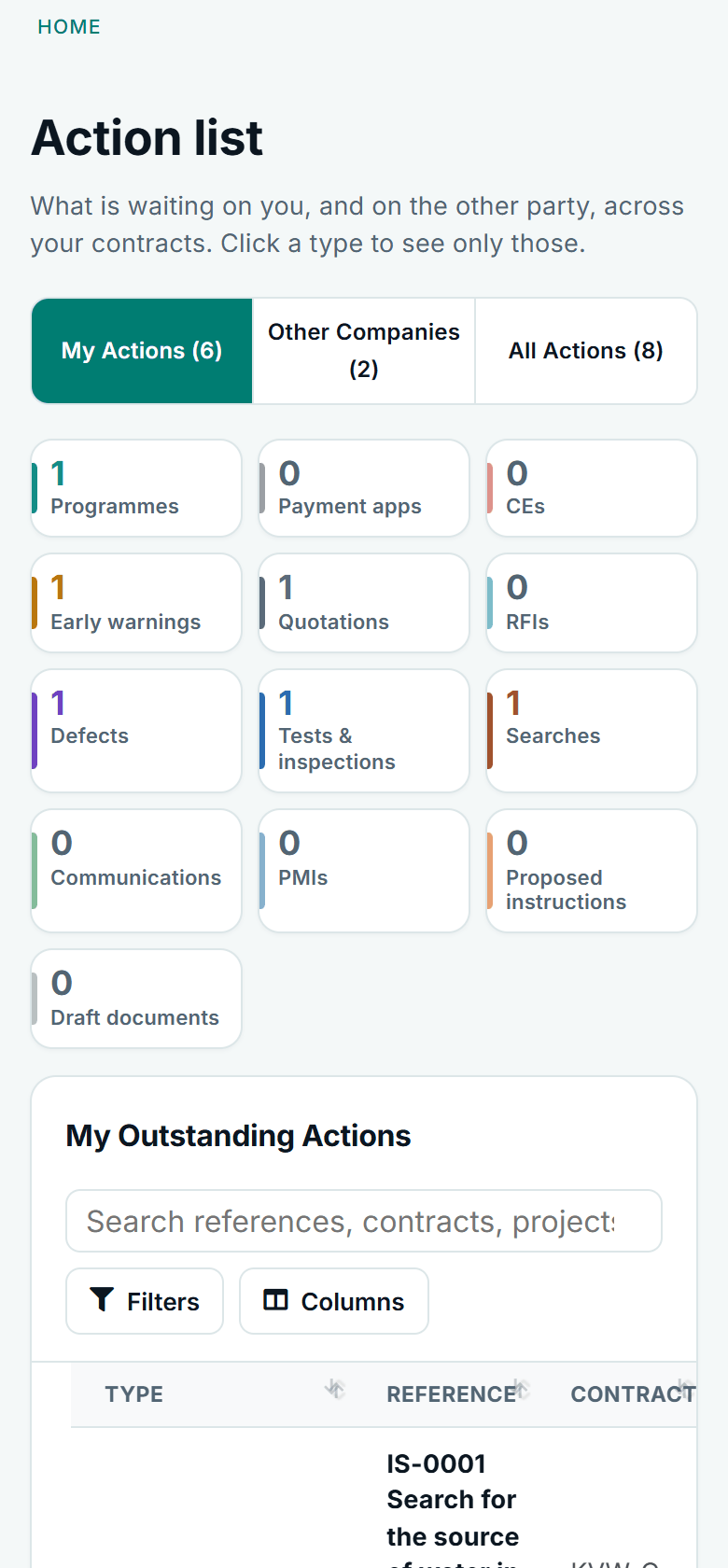
The same records on a phone
Registers, records and the Action List work at phone width, so the site team can see where a notice stands and what the next step is.
- The next step is the main button on each record
- Register rows become blocks you can read on a small screen
- The banner explains a late reply in plain words
See it on a contract you can click through
The guided tour lets you walk the same fictional account yourself. Or book a demo, and bring the situation you are dealing with.