
When correcting Defects under NEC, the Contractor has to put a Defect right whether or not it has been notified, and has to correct a notified Defect before its defect correction period ends. For a Defect notified before Completion, that period starts at Completion; for a later one, it starts at notification.
These rules are at clause 44 of the NEC4 ECC and clause 43 of NEC3. The length of the period comes from the Contract Data, so no standard number applies. They form one step in the wider NEC quality and Defects process.
Working out the due date
| Situation | When the clock starts | NEC4 / NEC3 |
|---|---|---|
| Notified before Completion | At Completion | 44.2 / 43.2 |
| Notified at or after Completion | When it is notified | 44.2 / 43.2 |
| Correction needs access to a part the Client has taken over | Once the access and use it needs are in place | 44.4 / 43.4 |
The Contract Data can set different periods for different types of Defect, for example a shorter one for a failure that stops a building operating. Look for those entries, since a register with a single default can be wrong for some items. The definition of the defect correction period has more.
A worked example
A fictional school extension with an illustrative Contract Data period of 3 weeks, and a shorter 1 week for heating faults between October and March.
| Defect | Notified | Period starts | Correct by |
|---|---|---|---|
| Cracked floor tile, Room 4 | 2 weeks before Completion | Completion (1 September) | 22 September |
| Door closer failing, taken-over wing | 6 October | Access given on 13 October | 3 November |
| Boiler fault | 10 November | 10 November | 17 November |
The door closer shows why access dates are worth recording. If the Client's staff can't release the wing for a week, the clock waits for them. Without a note of the date, nobody can show when correction was due.
Does a Defect stop Completion?
Not automatically. Completion is defined by reference to the Scope and to notified Defects that would stop the Client using the works and Others doing their work. A Defect that doesn't do that can stay on the list without holding Completion up. That's the reason correction periods can begin at Completion for Defects notified earlier.
Who pays
Correcting a Defect doesn't give the Contractor a compensation event. How that plays out depends on the main Option.
| Main Option | How the cost falls |
|---|---|
| A and B | The Prices don't change. The cost reduces the Contractor's margin |
| C and D | After Completion, it's Disallowed Cost. Before Completion, it stays in Defined Cost unless caused by ignoring a constraint in the Scope, so it affects the final share |
| E | The same Disallowed Cost test applies. The Contractor otherwise recovers Defined Cost plus Fee |
Our guide to Disallowed Cost goes through the full definition. If Option X15 applies, the position changes for a design Defect where reasonable skill and care were used; that is covered in the X15 guide.
Showing corrections on the programme
A revised programme has to include the Contractor's plans for dealing with notified Defects. It's easily forgotten once the main works finish, but when correction work needs possessions or shutdowns it should be planned as carefully as any other activity.
Common mistakes
- Counting from the wrong date. A Defect notified in June on a job completing in September doesn't become overdue in July.
- Not asking for access. Make the request in writing, naming the date you need. If access doesn't come before the defects date, a different rule applies, covered in uncorrected Defects.
- Closing an item on the Contractor's word alone. Have the Supervisor confirm the correction meets the Scope, particularly where a test was the original trigger. The test is then repeated.
- Assuming the Supervisor has to notify first. A Defect the Contractor finds itself still has to be corrected.
Related guides
- Quality and Defects Under NEC
- Uncorrected Defects
- Accepting a Defect
- Defects Date Explained
- Searching for Defects
- Notifying Defects
How this looks in Contract Status
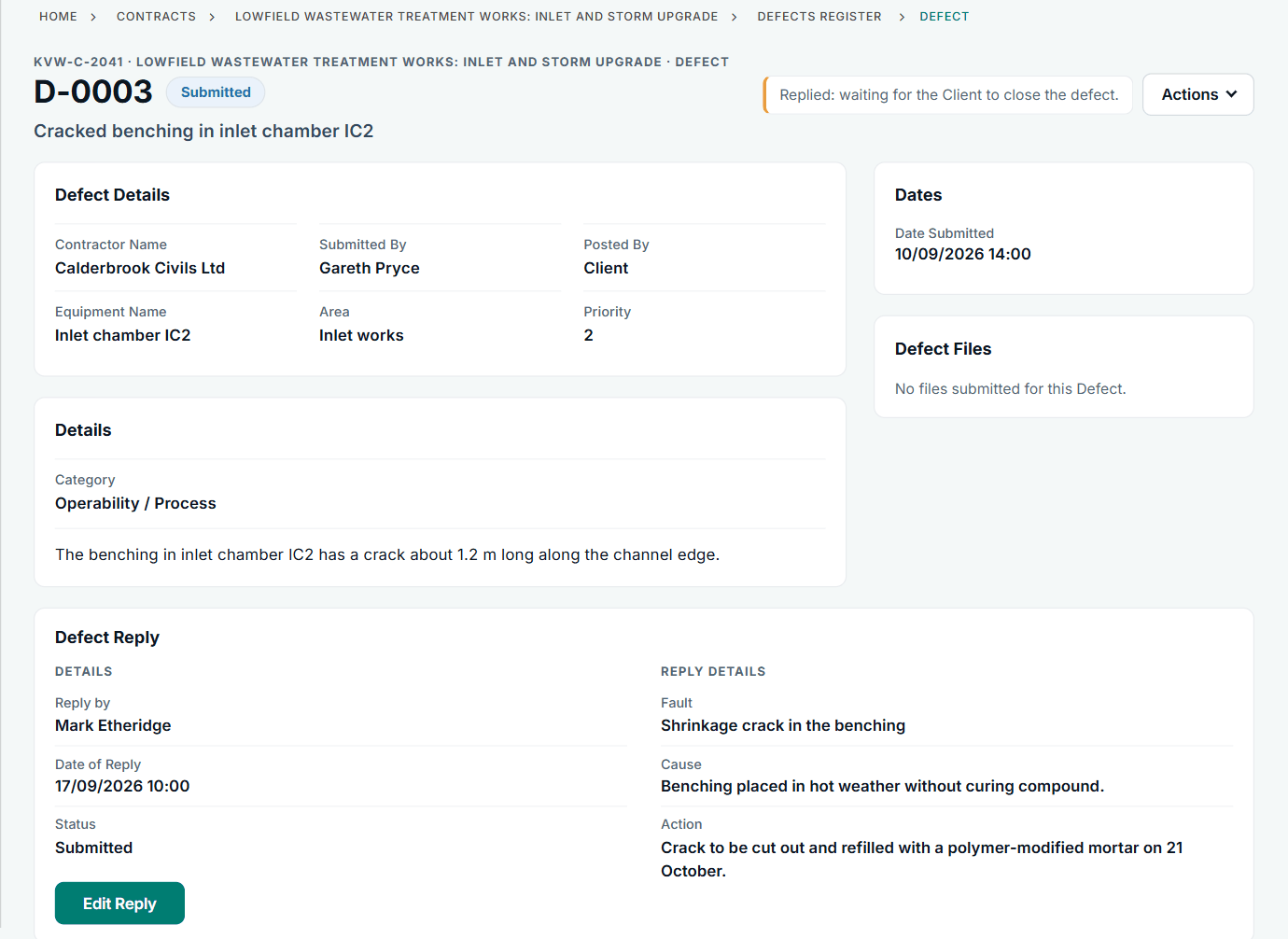
A Defect with the Contractor's reply: fault, cause and action. See the worked example.
See how this works in practice
Click through Contract Status with sample contracts: raise the notice, reply to it, and watch both sides of one record.
Take the guided tour Book a demo
Try the Supervisor role-play, use the free NEC tools or download free NEC templates.
This guide is general information in our own words, not legal advice. Your contract and its Contract Data always govern. NEC, NEC3 and NEC4 are trade marks of Thomas Telford Ltd; Contract Status is not affiliated with or endorsed by NEC.