
The NEC Project Manager role comes down to a set of tasks, each with a clause and many with a time limit. This checklist sets them out by stage of an NEC4 Engineering and Construction Contract (ECC), so you can use it as a working list.
The periods shown are the ECC's defaults or the fixed periods in its clauses. Where the entry says "period for reply", or where a value appears in your Contract Data, your own contract governs. Subcontracts often differ. For the bigger picture, see the guide to NEC roles.
Before and at the start
- Check the Contract Data: names, addresses, dates, reply periods and which Options apply.
- Notify the Contractor of any delegates and the actions each one may take (14.2).
- Agree how communications will be sent, and confirm the system if the Scope names one (13.1, 13.2).
- Set up the Early Warning Register within one week of the starting date, unless the contract says otherwise, and hold the first early warning meeting within two weeks.
- Diarise the first programme, and remember that a quarter of the assessed Price for Work Done to Date is held back until a first programme with the required content arrives (50.5), if none was named in the Contract Data.
Regular tasks
| Task | Clause | Time limit |
|---|---|---|
| Reply to a communication | 13.3 | Period for reply in the Contract Data |
| Accept or refuse a submission, with reasons | 13.4 | Period for reply |
| Accept or reject a programme | 31.3 | Two weeks from submission |
| Instruct a revised programme where needed | 32.2 | When required |
| Warn of matters that may affect price, time or performance | 15.1 | As soon as aware |
| Issue the revised Early Warning Register after each meeting | 15.4 | One week from the meeting |
| Assess the amount due | 50.1 | Each assessment date |
| Certify payment | 51.1 | One week from the assessment date |
Compensation events
| Task | Clause | Time limit |
|---|---|---|
| Notify an event caused by an instruction or changed decision | 61.1 | When giving it |
| Instruct quotations with the notification | 61.2 | Same time |
| Reply to a Contractor's notification | 61.4 | One week, or longer if the Contractor agrees |
| Reply to a quotation | 62.3 | Two weeks from submission |
| Explain any instruction for a revised quotation | 62.4 | With the instruction |
| Agree any extension before time runs out | 62.5 | Before the date passes |
| Make your own assessment, in the listed cases | 64.1, 64.3 | The time allowed for a quotation, from when the need became clear |
| Answer a proposed-instruction quotation | 65.2 | By the date you said you might give the instruction |
| Consider a warning failure, if justified | 61.5 | In the instruction to quote |
A late answer to 61.4, 62.3 or 64.3 lets the Contractor notify the failure. If there is still no answer two weeks later, the event or quotation is treated as accepted. Put these dates in the diary as soon as a document arrives, and read the compensation events guide if the sequence is new to you.
Change, instructions and problems
- Say how any ambiguity or inconsistency in the documents will be resolved (17.1).
- Change the Scope if it asks for something illegal or impossible (17.2).
- Instruct how to deal with an event that prevents the work (19.1).
- Instruct a stop, restart or removal of stopped work (34.1).
- Instruct a quotation for acceleration if finishing early is being discussed (36.1).
- Deal with a Contractor's proposal to reduce the amount the Client pays (16.1, 16.2).
- Assess extra cost if a Key Date Condition is missed (25.3).
- Instruct the correction of a failure to follow the quality plan (40.3).
The instructions guide shows how to word and record these.
Completion, Defects and close-out
- Decide the date of Completion and certify it within one week (30.2).
- Certify the date the Client takes over any part of the works (clause 35).
- Consider any proposal to accept a Defect, then instruct the change to the Scope if accepted (45.1, 45.2).
- Assess what an uncorrected Defect will cost others to correct (46.1), or what it would have cost the Contractor if access wasn't given (46.2).
- Make the final assessment within the time allowed after the Defects Certificate, or a termination certificate (53.1). See the final assessment guide.
- Issue a termination certificate promptly if a Party gives a valid reason (90.1), and follow the instructions that go with it (92.2).
A weekly self-check
- What did the Contractor send me this week, and when is each reply due?
- Has anything arrived that I treated as chat but which needs a contract reply?
- Did any instruction, certificate or changed decision cause a compensation event I haven't notified?
- Are all my delegates still in post, and is cover in place for next week?
- Does the register reflect the latest meeting?
- Does the latest programme need accepting, or a reason for refusing?
If the answer to question 2 catches you out regularly, build it into a fixed weekly routine and have a second person review the inbox. The main things to get right are simple: reply on time, give the reason when you refuse, and make the record match what happened.
What to look up in your own contract
- The period for reply, and any different period agreed in writing.
- Assessment intervals and any changed payment period.
- Any Z clause giving the Client approval rights over your decisions.
- Options that add tasks, such as X7, X5 or Y(UK)2.
NEC3 ECC runs on similar lines, but the numbers change. Early warnings sit in clause 16 instead of 15, and there is no deemed acceptance of a programme, no Contractor's application under 50.2 and no final assessment under 53.
Related guides
- NEC Roles: Who Does What on an NEC Contract
- The NEC Supervisor
- The Supervisor Under NEC4
- The Contractor's Duties Under NEC
- The NEC Project Manager
How this looks in Contract Status
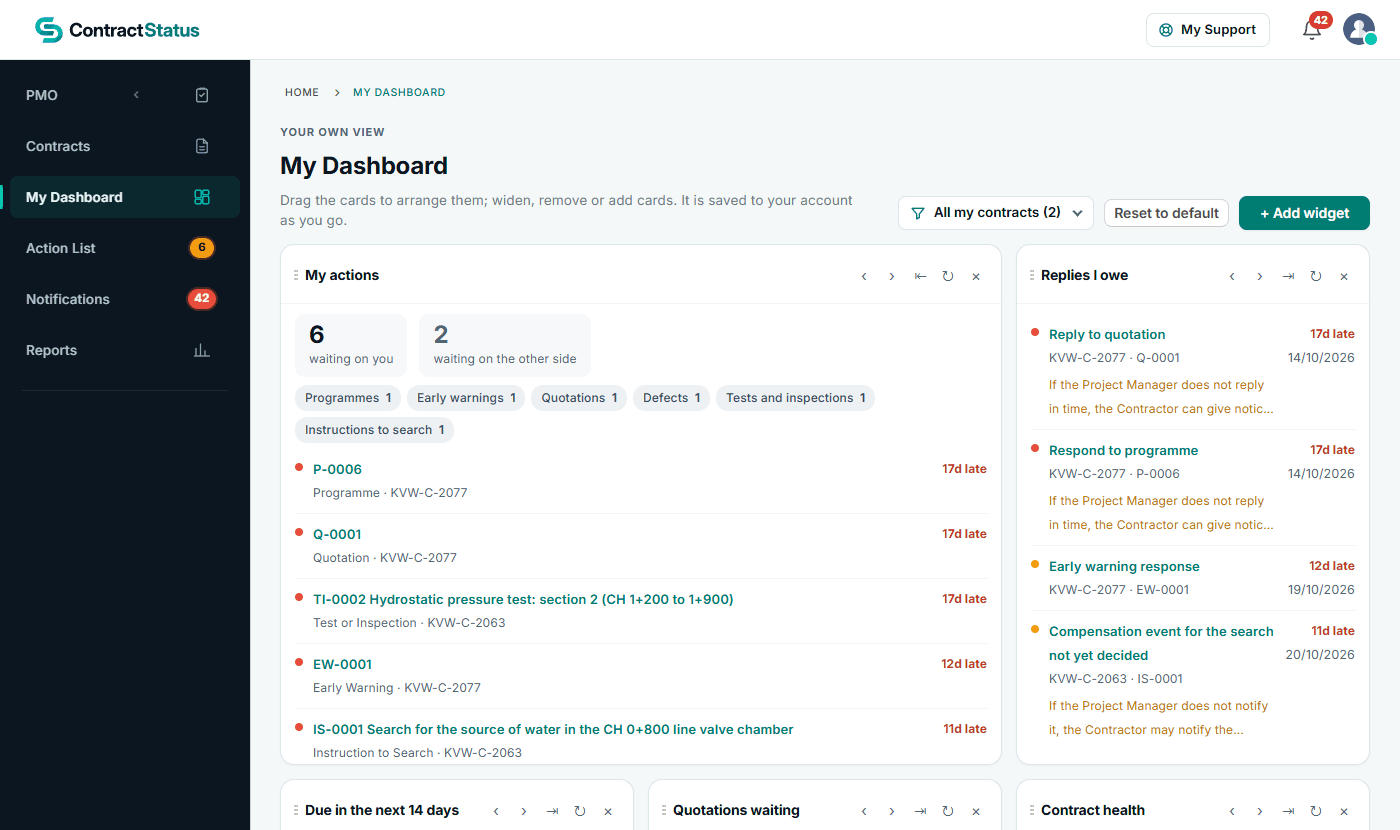
My Dashboard: what is waiting on you and which replies you owe. See the worked example.
See how this works in practice
Click through Contract Status with sample contracts: raise the notice, reply to it, and watch both sides of one record.
Take the guided tour Book a demo
Try an NEC role-play, use the free NEC tools or download free NEC templates.
This guide is general information in our own words, not legal advice. Your contract and its Contract Data always govern. NEC, NEC3 and NEC4 are trade marks of Thomas Telford Ltd; Contract Status is not affiliated with or endorsed by NEC.