
An NEC Project Manager instruction should be in writing, name the clause that allows it and say exactly what the Contractor is to do. If it changes the Scope, a compensation event notice and a request for quotations should go with it.
The Contractor must obey an instruction the contract allows (27.3), so this is one of the Project Manager's strongest tools, and one of the easiest to misuse. Clauses below are from the NEC4 Engineering and Construction Contract (ECC). For the wider role, see the NEC Project Manager, and for all roles, NEC roles.
Instructions the contract provides for
| Instruction | NEC4 ECC | Compensation event? |
|---|---|---|
| Change the Scope | 14.3 | Usually, 60.1(1), subject to its exceptions |
| Change a Key Date | 14.3 | Yes, 60.1(4) |
| Attend an early warning meeting | 15.2 | No |
| Change the Scope after accepting a Contractor's proposal | 16.2 | Read the clause with your main Option |
| Say how an ambiguity or inconsistency is resolved | 17.1 | Depends on the outcome |
| Change the Scope where it is illegal or impossible | 17.2 | Check against the 60.1(1) exceptions |
| Deal with a prevention event | 19.1 | Yes, 60.1(19) |
| Submit the design of an item of Equipment | 23.1 | No |
| Remove a person, with reasons | 24.2 | No |
| Submit a revised programme | 32.2 | No |
| Stop or not start work; restart or remove from the Scope | 34.1 | Yes, 60.1(4) |
| Quote for acceleration | 36.1 | No |
| Correct a failure to follow the quality plan | 40.3 | No |
| Accept a Defect | 45.2 | No, 60.1(1) excludes this |
| Submit alternative quotations | 62.1 | No |
| Deal with a valuable or historic object | 73.1 | Yes, 60.1(7) |
A search for a Defect under 43.1 is the Supervisor's instruction, not the Project Manager's. Not all Option clauses are shown, so check any you are using.
How to issue one, step by step
- Check you hold the power. Is it in the list above, or is it a delegated power? A request outside the contract is only a request.
- Decide whether to test the price first. If you aren't sure the Client will want it at any price, consider asking for a quotation for a proposed instruction (65.1). The Contractor doesn't act until the instruction is given.
- Write down what is to change. Be specific: drawing revision, location, standard, and what is removed as well as what is added.
- Cite the clause and contract name. Use a unique reference, and send it via any communication system the Scope names (13.2).
- Notify the compensation event. When your instruction causes an event, you notify it when you give the instruction (61.1).
- Instruct quotations with the notification (61.2), unless the event is the Contractor's fault or quotations are already in.
- Enter it in the registers, and diarise the three weeks for quotations (62.3).
An example you can adapt
A fictional contract. Use your own format and the terms of your own contract.
Project Manager's Instruction 027, Riverside Primary School Extension. Given under clause 14.3 of the contract. The Scope is changed as follows: replace the entrance canopy shown on drawing A-210 rev C with the canopy on drawing A-210 rev D, issued with this instruction. Other work on the drawing is unaffected.
I notify this as a compensation event under clause 60.1(1) and instruct you to submit quotations under clause 61.2.
The Project Manager instruction template has a fuller layout.
What goes wrong
- "No cost implication" on the form. Whether something is a compensation event comes from the contract, not your label. A quotation showing nil effect is the right outcome if there is no effect.
- Instructions in meeting minutes. They can create confusion over whether anything was actually instructed. If a meeting agrees something, send the instruction afterwards.
- Replies to technical queries. A reply saying "do it this way" can amount to a change. Consider whether an instruction is needed before you press send.
- Disguised acceleration. You can't instruct the Contractor to finish early through 14.3 or by withholding a Completion Date change. Acceleration runs through 36.1, which needs a quotation and agreement.
- Silence after an oral request. Follow up in writing the same day. All required communications must be readable, copyable and recordable (13.1).
- Going back on it casually. Changing a decision you already communicated is a compensation event under 60.1(8).
If you are the Contractor
If something looks like an instruction but is unclear, ask for it to be confirmed under the clause it relies on. If it came from someone without a notified delegation, query it right away. If you've received a valid instruction with no compensation event notice, you can notify one yourself under 61.3, and the eight-week limit doesn't bar an event arising from an instruction. The change in the Scope guide covers how this event works.
NEC3 differences
NEC3 ECC uses Works Information for the Scope, and early warning instructions are under clause 16. Ambiguity and illegal or impossible requirements are in 17.1 and 18.1, and proposed instructions run through 61.2 and 62.3 rather than clause 65.
Related guides
- NEC Roles: Who Does What on an NEC Contract
- NEC Accreditation: How It Works
- An NEC Guide for Commercial Managers
- What an NEC Contract Manager Does
How this looks in Contract Status
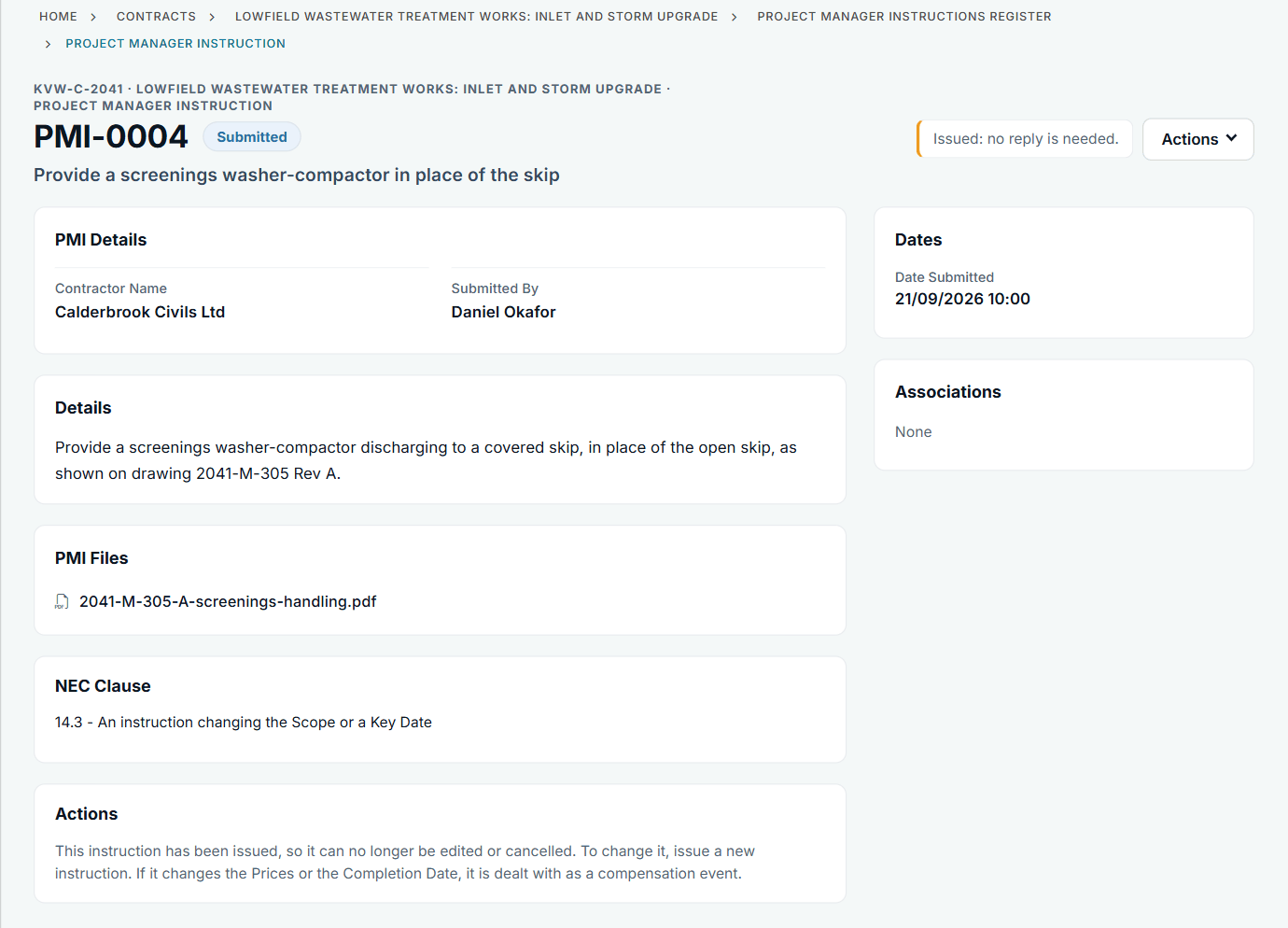
An issued instruction with its file and clause. See the worked example.
See how this works in practice
Click through Contract Status with sample contracts: raise the notice, reply to it, and watch both sides of one record.
Take the guided tour Book a demo
Try an NEC role-play, use the free NEC tools or download free NEC templates.
This guide is general information in our own words, not legal advice. Your contract and its Contract Data always govern. NEC, NEC3 and NEC4 are trade marks of Thomas Telford Ltd; Contract Status is not affiliated with or endorsed by NEC.