
The NEC client is the Party paying for the works, and its direct duties are few: give access, provide what the Scope promises, take over the works and pay on time. Most of its day-to-day influence is exercised through the Project Manager it appoints.
NEC4 uses the term Client; NEC3 calls the same Party the Employer. The clauses below are for the NEC4 Engineering and Construction Contract (ECC). They show why a Client's own actions can still become compensation events. For the other roles, see NEC roles explained.
What the Client must do
| Duty | Clause | If it goes wrong |
|---|---|---|
| Give the Contractor the access to the Site it needs, and let it use the Site | 33.1 | Compensation event, 60.1(2) |
| Provide services and other things stated in the Scope | 25.2 | Compensation event, 60.1(3) |
| Provide materials, facilities and samples for tests if the Scope says so | 41.2 | Compensation event, 60.1(16) |
| Take over the works | Clause 35 | Using part of the works before Completion can mean taking it over; 60.1(15) may apply |
| Pay each certified sum within the time allowed | 51.2 | Interest on late payment |
| Act as the contract says, with mutual trust and co-operation | 10.1, 10.2 | Damaged working relationships, and potential breach |
| Carry the Client's liabilities | 80.1 | Compensation event, 60.1(14) |
Any other breach of contract by the Client that no other event covers falls under 60.1(18). So the compensation event system, not a separate damages claim, is the main route for the Contractor's time and money. The Client's liabilities guide explains what is on the list.
Powers the Client keeps
- Choosing the team. It names the Project Manager and Supervisor in the Contract Data and can replace either by notifying the Contractor (14.4).
- Terminating, where a reason in the contract applies (clause 90). The Project Manager issues the certificate. See termination overview.
- Giving a pay less notice under Option Y(UK)2 (Y2.3), no later than seven days before the final date for payment.
- Disputes. It can name Senior Representatives (NEC4), and refer a dispute to adjudication or the tribunal in line with the W Option.
- Agreeing contract changes. Changes to the conditions need both Parties (12.3).
What the Client shouldn't do
A Client's staff can easily talk directly to the Contractor about what they want. That talk doesn't count as a contract instruction, because 14.3 gives the power to change the Scope to the Project Manager.
A fictional example. A hospital estates manager tells the site agent that the ward layout "needs to move a door". The agent moves it. Weeks later the Contractor notifies a compensation event, and the Project Manager replies that no instruction was given. Now both sides have a problem: the Contractor has done work with no contract basis, and the Client has the change it asked for with an argument about paying for it. One phone call to the Project Manager at the start would have avoided it.
Keep these conversations to a known channel. If the Client wants a change, it asks the Project Manager, who decides whether to instruct it or to ask for a quotation first as a proposed instruction (65.1).
What the Client should prepare before the contract starts
- A Scope that says what is really needed, including tests, standards and what the Client will provide.
- Contract Data that is complete and internally consistent, including access dates, the Completion Date and the reply periods.
- A Project Manager with the time and authority to act within those periods.
- An internal approval route fast enough for the two-week response on a quotation (62.3). If a decision needs board approval, arrange a faster route for it before the contract starts.
- A way of paying that can meet the assessment date cycle. Certificates are due within one week of each assessment date (51.1) and payment within three weeks, unless the Contract Data says otherwise (51.2).
Where Clients most often lose money
- Late access. Dates in the Accepted Programme matter too, not only the Contract Data, so read each programme you accept.
- Late Client-supplied information or items. These appear on the programme. A slip is a compensation event under 60.1(3).
- Other contractors clashing. The Client's Others working outside the agreed times can trigger 60.1(5).
- Slow internal sign-off. Missed replies can lead to compensation events and deemed acceptance. The programme deemed acceptance guide covers one example.
- Using part of the works early. Taking possession before Completion can change who is responsible for it. Plan any early use and, if needed, say so in the Scope.
For a view of the whole contract from the Client's side, read managing NEC contracts for clients.
Related guides
- NEC Roles: Who Does What on an NEC Contract
- The Service Manager
- The Consultant Under the PSC
- The Adjudicator
- The Supervisor Under NEC4
- The Contractor's Duties Under NEC
How this looks in Contract Status
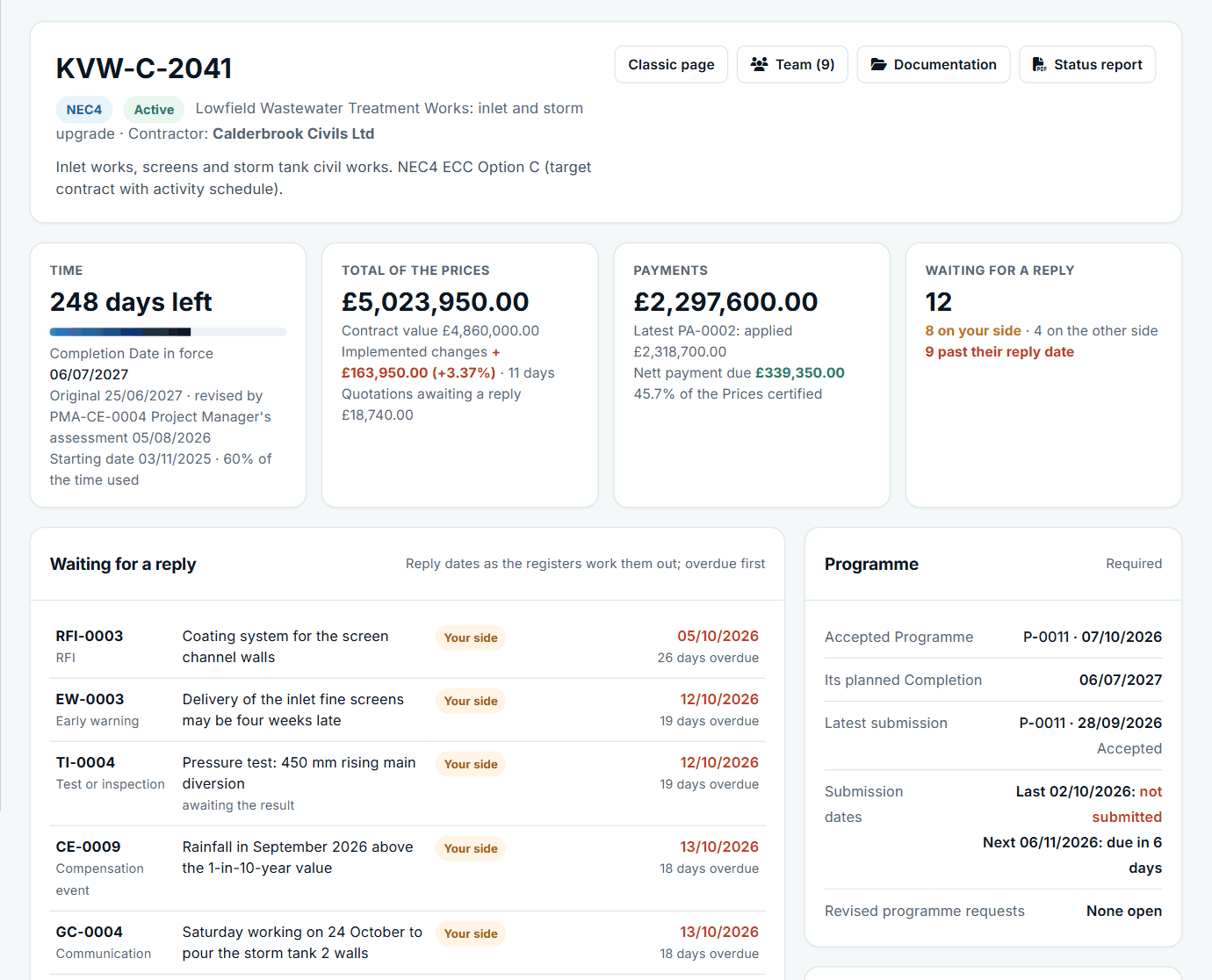
A contract at a glance: time, the total of the Prices, payments and replies waiting. See the worked example.
See how this works in practice
Click through Contract Status with sample contracts: raise the notice, reply to it, and watch both sides of one record.
Take the guided tour Book a demo
Try an NEC role-play, use the free NEC tools or download free NEC templates.
This guide is general information in our own words, not legal advice. Your contract and its Contract Data always govern. NEC, NEC3 and NEC4 are trade marks of Thomas Telford Ltd; Contract Status is not affiliated with or endorsed by NEC.