
This NEC PM instruction template gives you a layout for Project Manager instructions under the NEC4 Engineering and Construction Contract (ECC). A good instruction states the clause, what the Contractor has to do, and whether it is a compensation event, because 61.1 expects the Project Manager to notify that at the same time.
The wording is our own sample, not NEC text. It complements the guide to Project Manager instructions and forms part of managing NEC contracts.
The template
| Project Manager's instruction | PMI-[number] |
|---|---|
| Contract | [Name and number] |
| Date | [Date issued] |
| From / To | Project Manager: [name, or delegate acting under 14.2] / Contractor: [name] |
| Clause | [14.3, 34.1 and so on] |
| Instruction | We instruct you to [one clear action]. This applies to [location, drawing, specification reference]. |
| Reason | [Short, for the record] |
| Change to the Scope or Key Date | [Yes: what changes, including revised documents / No] |
| Compensation event | [Yes: see notification CE-(number), issued separately today / No, because (reason)] |
| Quotation | [Instructed in CE-(number) / Not required] |
Keep the compensation event notice as a separate communication (13.7), even though it goes the same day. Use our compensation event notice template for that.
Common instructions and their clauses
| Instruction | Clause | Compensation event? |
|---|---|---|
| Change the Scope or a Key Date | 14.3 | Generally, 60.1(1) or 60.1(4), with stated exceptions |
| Attend an early warning meeting | 15.2 | No |
| Resolve an ambiguity or inconsistency | 17.1 | Possibly, if it changes the Scope |
| Change a Scope item that is illegal or impossible | 17.2 | Possibly, depending on the circumstances |
| Deal with a prevention event | 19.1 | Possibly, 60.1(19) |
| Remove a person | 24.2 | Generally no |
| Submit a revised programme | 32.2 | No |
| Stop work, or not start it | 34.1 | Generally, 60.1(4) |
| Quote for acceleration | 36.1 | No: only a quotation |
| Correct a failure to follow the quality plan | 40.3 | No |
| Search for a Defect (given by the Supervisor) | 43.1 | Only if none is found, under the terms of 60.1(10) |
| Deal with an object of value or historic interest | 73.1 | Yes, 60.1(7) |
Use the "Generally" and "Possibly" entries as prompts, and check the event wording before you decide. The Scope change page has more on 60.1(1).
A completed example
A fictional instruction for a sea wall repair.
| Project Manager's instruction | PMI-023 |
|---|---|
| Clause | 14.3 |
| Instruction | We instruct you to use grade 316 stainless steel fixings in place of the galvanised fixings shown on drawing SW-210 for all handrail bases between chainage 120 and 280. |
| Reason | Client's durability review, given the location in the splash zone. |
| Change to the Scope or Key Date | Yes. Drawing SW-210 revision C is attached and replaces revision B. |
| Compensation event | Yes. See CE-031, issued separately today under 60.1(1). |
| Quotation | Instructed in CE-031. |
If the change is still only an idea
Under NEC4, the Project Manager can ask for a quotation before deciding, using a proposed instruction (65.1). The Contractor doesn't act on it. The reply comes by the date stated, and if the quotation isn't accepted, 60.1(20) makes that a compensation event, assessed under the normal rules. Don't send a proposed instruction with the wording of a real one. See proposed instructions under NEC4. NEC3 handles this through 61.2 with no equivalent event.
Tips for using it
- One instruction per number. That keeps the compensation event link clean.
- Be specific about revised documents. An instruction changing the Scope without updating what the Scope says leaves a muddle later.
- Don't dress it up as something else. A "clarification" that adds work is still a change. If it needs doing, call it what it is.
- Check authority. A delegate has to have been notified, and the Client's own team can't instruct directly under the contract.
- Contractor side: follow the instruction, then deal with the money. Clause 27.3 requires the Contractor to obey one given under the contract, even if the effect is disputed. If no notification arrives with it, notify it yourself.
Related guides
- Managing NEC Contracts: A Practical Guide
- Programme Submission Template
- NEC Forms: What You Need
- NEC Templates: A Practical List
- Compensation Event Notice Template
- Compensation Event Quotation Template
How this looks in Contract Status
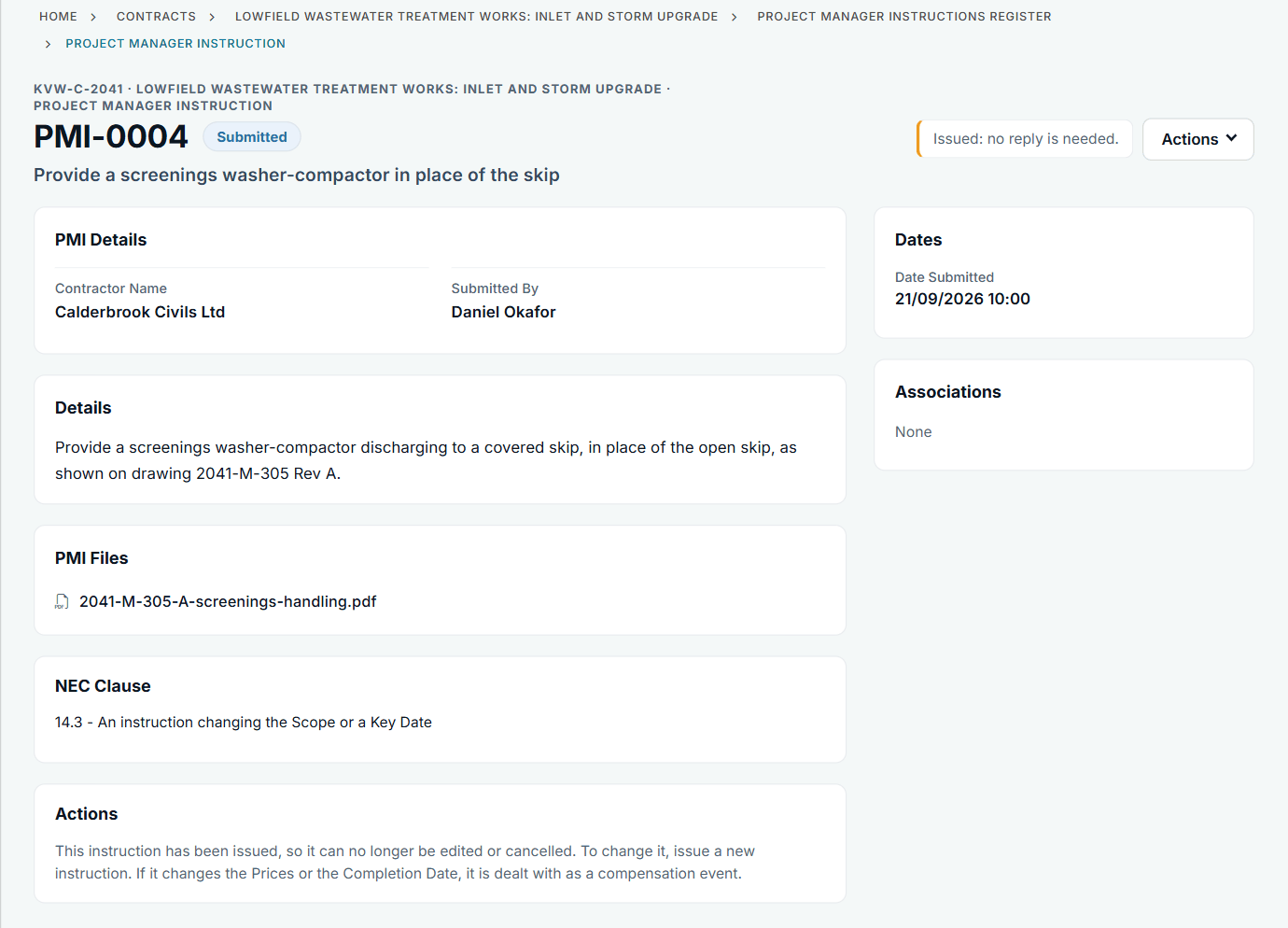
An issued instruction with its file and clause. See the worked example.
See how this works in practice
Click through Contract Status with sample contracts: raise the notice, reply to it, and watch both sides of one record.
Take the guided tour Book a demo
Get free NEC templates, use the free NEC tools or download free NEC templates.
This guide is general information in our own words, not legal advice. Your contract and its Contract Data always govern. NEC, NEC3 and NEC4 are trade marks of Thomas Telford Ltd; Contract Status is not affiliated with or endorsed by NEC.