
NEC contract administration is the daily work of giving and answering the communications the contract calls for, on time and on record, and keeping the registers and programme that show where the job stands. It belongs to the whole team, not to one administrator, though someone should own the system.
The contract names the roles but not the admin structure, so each job has to decide how to divide this work. The guide to managing NEC contracts gives the wider picture. This page deals with the split of work and how the processes feed each other under the NEC4 Engineering and Construction Contract (ECC).
Who does what
| Process | Contractor side | Project Manager side | Clause |
|---|---|---|---|
| Early warnings | Warns as soon as aware; attends meetings; carries out agreed actions | Warns as soon as aware; issues and updates the register | 15.1 to 15.4 |
| Programme | Prepares, updates and submits it | Accepts it or gives reasons for not doing so | 31.1 to 32.2 |
| Instructions | Follows them; checks what each one means for time and cost | Issues them and notifies any compensation event at the same time | 14.3, 27.3, 61.1 |
| Compensation events | Notifies, quotes and updates the programme | Notifies, replies, accepts or assesses | 61 to 66 |
| Quality | Runs the quality plan; tests; corrects Defects | The Supervisor tests, inspects and notifies Defects | 40.2, 41.3, 43.2, 44.2 |
| Payment | Applies before each assessment date | Assesses and certifies | 50.1, 50.2, 51.1 |
In practice, the people doing this sit in several functions. On the Contractor side, a planner holds the programme, a quantity surveyor leads on quotations and applications, and site managers supply the facts. The Project Manager may delegate many actions under 14.2, but only after notifying the Contractor who has what, so keep the delegation list current.
How the processes feed each other
Treating each register as separate work is a common reason for admin feeling endless. In a live contract, one fact usually moves several records. Consider a fictional example: on a culvert job, the Project Manager instructs an extra headwall.
- The instruction changes the Scope (14.3) and goes in the instruction log.
- The Project Manager notifies the compensation event at the same time, with an instruction to quote (61.1, 61.2). A line opens in the compensation event register, and a quotation date is set.
- If a matter on the Early Warning Register is related, the register records that link at the next meeting.
- The quotation includes any change the Accepted Programme needs (62.2), so the planner reviews the effect on planned Completion.
- Once implemented, the Prices and any dates change. The next application and the next revised programme should reflect that.
Walk through a few events like this with both teams early on. People then see why a delay in one step becomes a problem in another.
A sensible day-to-day split
- One log, one numbering system. Agree references at the start, so a notice has the same number on both sides.
- A named owner for every open item. "Commercial team" isn't an owner. Use a person, and have a named deputy for leave.
- A shared view of what is due. Each side should be able to see the same list of reply dates. The weekly NEC routine shows how to use it.
- Site facts captured the same day. A diary note written that day is worth far more than a recollection written for a quotation weeks later.
- Short, frequent commercial meetings. Half an hour a week on open events usually prevents a large monthly backlog.
What gets administrators into trouble
- Agreeing things in meetings and not issuing them. Under 13.1, a communication has to be readable and capable of being copied and kept on record. Minutes rarely do the job of a notice or instruction. See managing NEC communications.
- Bundling. A notification or certificate has to go separately from other communications (13.7), so don't tuck it into a progress report.
- Relying on memory for amendments. Z clauses often change periods and procedures. Keep a one-page summary of what differs from the standard form, and give it to anyone new on the job.
- Treating acceptance as a transfer of risk. Under 14.1, an acceptance leaves the Contractor just as responsible for delivering the works. Accepting a design or programme isn't approval of its content.
NEC3 ECC follows the same pattern with different terms and some different numbers: the Employer, Works Information and early warnings at clause 16. Clause 13.7 and 14.1 work the same way in both. If your team is split across editions, the NEC3 vs NEC4 guide sets out what changes.
Related guides
- Managing NEC Contracts: A Practical Guide
- The First 30 Days on an NEC Contract
- Running an NEC Kick-off Meeting
- A Weekly NEC Routine
How this looks in Contract Status
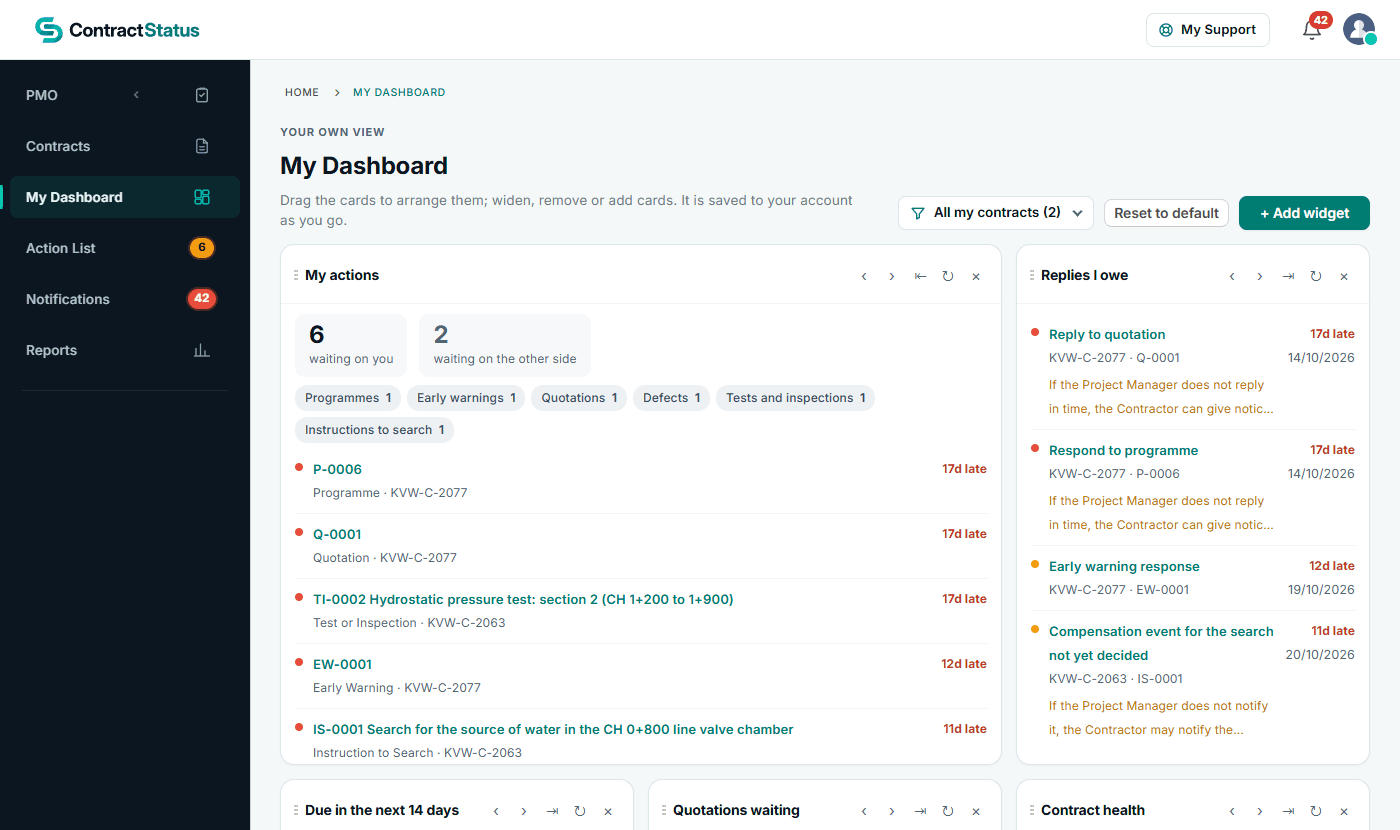
My Dashboard: what is waiting on you and which replies you owe. See the worked example.
See how this works in practice
Click through Contract Status with sample contracts: raise the notice, reply to it, and watch both sides of one record.
Take the guided tour Book a demo
Get free NEC templates, use the free NEC tools or download free NEC templates.
This guide is general information in our own words, not legal advice. Your contract and its Contract Data always govern. NEC, NEC3 and NEC4 are trade marks of Thomas Telford Ltd; Contract Status is not affiliated with or endorsed by NEC.