
NEC communications are governed by clause 13, which requires anything the contract calls for to be readable, and capable of being copied and kept on record. Good management of them means keeping notices separate, knowing when each takes effect, and logging every one against its reply date.
The rules are short, but they sit behind every other process. For the clause itself, see the guide to clause 13; this page deals with running it day to day, for the NEC4 Engineering and Construction Contract (ECC) and NEC3 where it differs. It forms part of the guide to managing NEC contracts.
The rules in short
| Rule | Clause | What it means in practice |
|---|---|---|
| Readable, copyable, recordable, in the contract's language | 13.1 | Emails and system messages can qualify. A phone call or chat in the site cabin doesn't. |
| When it has effect (NEC4) | 13.2 | Through the system the Scope specifies, if there is one; otherwise on receipt at the last notified address or the Contract Data address. |
| Period for reply | 13.3 | Applies unless the contract states a different time. |
| Replying to submissions | 13.4 | If not accepting, give reasons with enough detail for the matter to be corrected. |
| Extending the period | 13.5 | Both have to agree before the reply is due, and the extension is recorded. |
| Separate notifications and certificates | 13.7 | They can't be mixed in with other communications. |
| Withholding acceptance | 13.8 | For a reason the contract states, it isn't a compensation event. For another reason, it may be (60.1(9)). |
The separate rule causes the most trouble. A notice buried in a progress report or at the bottom of a long email chain invites the argument that it wasn't validly given. The fix is easy: send each notification on its own, with a subject line that says what it is.
Which communications you'll send most
- Notifications: early warnings, compensation events, Defects, the failure to reply
- Instructions: changes to the Scope, stopping work, revising the programme. See Project Manager instructions
- Submissions for acceptance: programmes, design, the names of subcontractors, the quality plan
- Quotations and assessments for compensation events
- Certificates: payment, Completion, take over, Defects
Agree a reference prefix for each and use it in the subject line. A consistent subject line such as "CE-014 Notification: buried foundation at grid C4" lets anyone find it two years later.
What a usable log contains
The communications log is the master list; the registers draw on it. For each item, record:
- Reference and type
- Date sent, from whom, to whom
- Clause it is given under
- Reply required? Reply date, and the basis for that date
- Date the reply was received, and what it said in a few words
- Any extension: the date it was agreed and the new reply date
- Link to the document, with proof of delivery if not sent through a contract system
Emails, systems and meetings
If the Scope names a communication system, use it for everything the contract requires, since NEC4 13.2 ties effect to that system. An email sent outside it may not count, however clear it is. If the Scope names no system, agree a project mailbox and a format at the kick-off meeting.
Under NEC3 ECC, 13.2 is simpler: a communication takes effect on receipt at the last notified address, or otherwise the one in the Contract Data. It says nothing about a communication system, so if your Works Information or a Z clause specifies one, check how the two fit together.
Meetings need more care. Minutes record what was said, but they are not usually an instruction, a notification or an acceptance. If a decision made in a meeting needs contract effect, issue the proper communication afterwards. The same applies to a chat in a corridor, and doubly so where someone says "just crack on".
Common mistakes
- Reply-all chains. A key statement ends up in the fifth email of a thread and can't be found. Start a new communication.
- Sending to a person, not the role. When someone leaves, their mailbox closes. Use the address notified for the role.
- Vague wording. "Please note the delay" isn't clearly a notification of anything. State which clause you're acting under.
- Over-communicating. Marking everything as a formal notice buries the ones that matter and strains relationships. Keep informal contact informal, and put only contract actions in the log.
Our letter templates guide gives sample wording for the common communications.
Related guides
- Managing NEC Contracts: A Practical Guide
- Tracking Periods for Reply
- NEC Time Bars Explained
- A Table of Key NEC Time Periods
- Running an NEC Kick-off Meeting
- A Weekly NEC Routine
How this looks in Contract Status
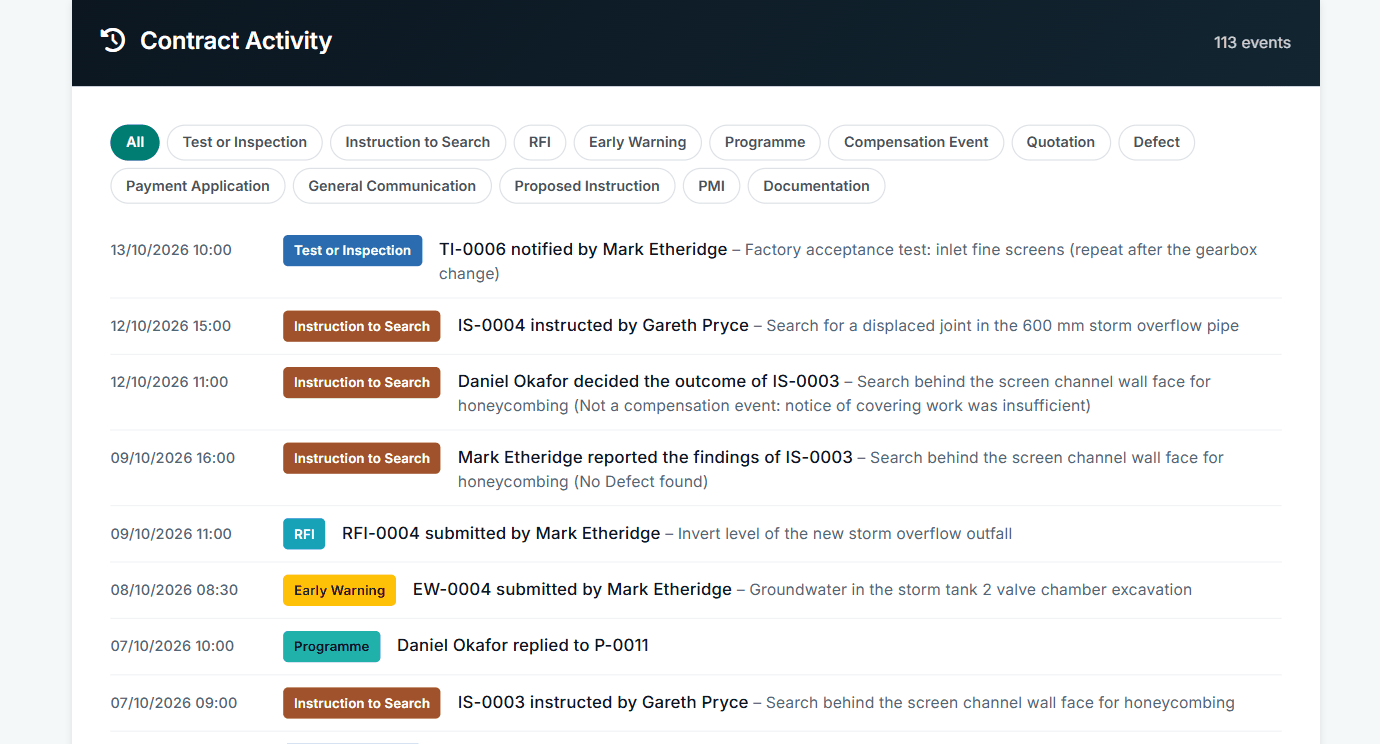
Contract Activity: every step, dated and named. See the worked example.
See how this works in practice
Click through Contract Status with sample contracts: raise the notice, reply to it, and watch both sides of one record.
Take the guided tour Book a demo
Get free NEC templates, use the free NEC tools or download free NEC templates.
This guide is general information in our own words, not legal advice. Your contract and its Contract Data always govern. NEC, NEC3 and NEC4 are trade marks of Thomas Telford Ltd; Contract Status is not affiliated with or endorsed by NEC.