
An NEC spreadsheet can run a small contract perfectly well if one person owns it and it is checked every week. It starts to fail once several people edit copies, several contracts share a tracker, or someone needs to prove what was sent and when. The contract doesn't care what tool you use, only that replies are on time and on record.
This page is a practical look at where the method works and how to make it safer. It goes with the registers every NEC contract needs and the wider guide to managing NEC contracts.
Where spreadsheets work and where they don't
| Situation | Spreadsheet? | Why |
|---|---|---|
| One short contract, few events, one administrator | Fine | Low volume, one version, clear ownership |
| A short-form contract with little formal process | Fine | Few clocks to track |
| A mid-size ECC with several commercial staff | Workable with discipline | Needs locked formulas, one location and weekly checks |
| Several contracts on one tracker | Risky | Periods differ between contracts, and formulas get copied across wrongly |
| Main contract and subcontracts, linked | Risky | Linking dates across files breaks easily |
| Both Parties need the same live view | Weak | Two copies drift. Shared files get overwritten |
| An audit or dispute is likely | Weak on its own | A spreadsheet shows a date someone typed, not proof that it happened |
The usual ways they fail
- The reply date formula is wrong. Someone hard-codes one week into every row, which misses a Z clause or a subcontract's different figures.
- A row gets overwritten. A filter is on, a paste goes across hidden rows, and nobody notices for months.
- Nobody is reminded. A reply date in a cell doesn't chase anyone. If the owner is away, the sheet sits there.
- Status means different things. "Closed" means implemented to one person and rejected to another.
- The evidence is elsewhere. Notices sit in mailboxes, and if someone leaves, the link from the row to the document leaves too.
- Totals drift. The value in the register no longer matches the last payment certificate, and no one knows which is right.
Fixes that make one safer
- One file, one location, one owner. Ban emailed copies. Others can view it, and a named person or small team edits it.
- A lookup table for periods. Put the contract's actual periods on a settings tab, and have every reply date formula read from it. That way a change is made in one place.
- Validated drop-downs for status and event type. Set out the meaning of each status in a note.
- Protected formula columns. Lock everything apart from the input fields.
- An "action required" column that works out what's overdue and what's due in the next seven days, and is the first thing you sort by each week.
- A document link in every row. Point it to a project folder, not a person's mailbox.
- A monthly frozen copy. Save a dated read-only version, so you can show what the position was at any date.
- A monthly reconciliation against the other side's list and against the certificate.
A simple reply date formula
If the settings tab holds the period in weeks for each communication type, the logic is: reply date = start date + period × 7, unless an extension date is present, in which case use that. Then flag the row if there's no reply date recorded and today's date is within seven days of it. With fictional dates: a quotation submitted on 6 May, two weeks allowed, gives a reply date of 20 May, with a flag from 13 May.
Note this counts calendar weeks. Check whether your contract or your team's convention says otherwise, and read tracking periods for reply for the traps. Also keep the awareness date in its own column so the 61.3 check can run the same way.
Signs you have outgrown it
- You've missed a reply because the owner was on leave.
- You've had to work out which of two copies is right.
- Someone spends a day each month reconciling it.
- A senior person asks for a cross-contract view, and it takes a week to produce.
- You can't quickly show the date a notice was sent or who received it.
At that point, the admin cost of the tracker is likely to be more than that of a proper system. Contract Status is one option built around these NEC processes, and there is a fuller comparison in software vs spreadsheets. Whichever you pick, the routine matters more than the tool.
Related guides
- Managing NEC Contracts: A Practical Guide
- Keeping a Clear NEC Audit Trail
- Managing NEC Subcontracts
- Making Clause 10 Work in Practice
- NEC Forms: What You Need
- NEC Templates: A Practical List
How this looks in Contract Status
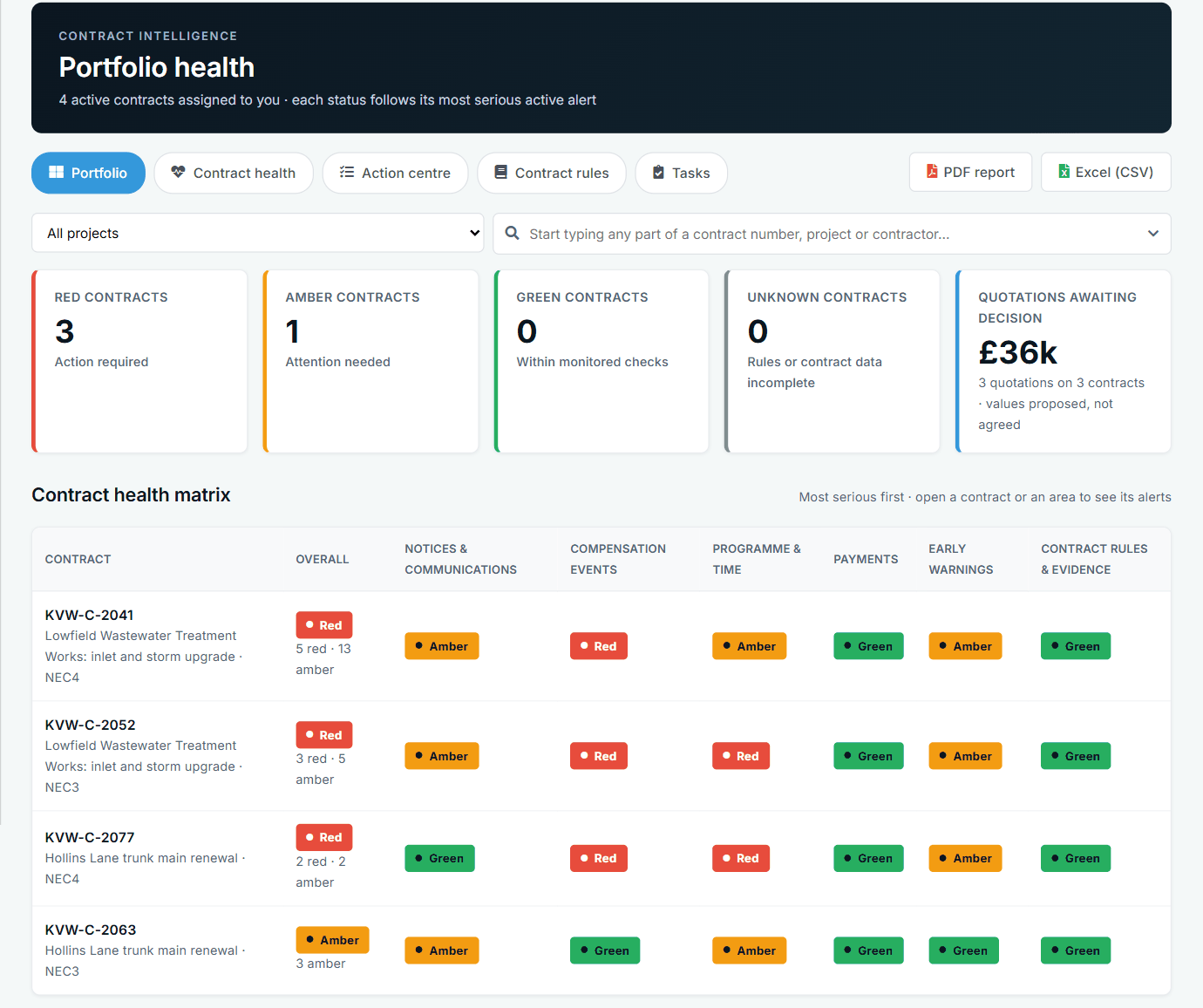
Portfolio health across contracts, by area. See the worked example.
See how this works in practice
Click through Contract Status with sample contracts: raise the notice, reply to it, and watch both sides of one record.
Take the guided tour Book a demo
Get free NEC templates, use the free NEC tools or download free NEC templates.
This guide is general information in our own words, not legal advice. Your contract and its Contract Data always govern. NEC, NEC3 and NEC4 are trade marks of Thomas Telford Ltd; Contract Status is not affiliated with or endorsed by NEC.