
Clear NEC records let anyone reconstruct what happened, who knew, what was said and what it cost, without relying on memory. On any option that means communications, programmes, site records and decisions; on cost-based Options it also means the Defined Cost records required by clause 52.
You won't usually know which record will matter until later, so the aim is a system that captures the basics without extra effort. This page is about the NEC4 Engineering and Construction Contract (ECC), and forms part of managing NEC contracts. On audit rights specifically, see audit under NEC.
What to keep
| Record | What it can prove | Who should own it |
|---|---|---|
| All contract communications, with dates and delivery | A notice was given or a reply was late | Contract administrator |
| Every programme revision, native and PDF, with the reply | What the Accepted Programme was at any date | Planner |
| Site diaries | What happened that day, and when someone became aware | Site manager |
| Labour and plant allocation sheets | What resources were working on what | Site manager, QS |
| Photos and video, dated and located | The physical position at a moment | Site team |
| Weather records | The basis for 60.1(13), from the place the Contract Data names | Site manager |
| Delivery notes and purchase records | When things arrived, and their cost | Commercial team |
| Test results and inspection records | Quality, Defects and any delay from testing | Quality lead, Supervisor |
| Meeting notes | What was discussed and decided | Chair of each meeting |
| Registers, with dated monthly copies | The position as it stood at the time | Register owner |
Extra records on cost-based Options
Under Options C, D and E, clause 52 sets out records for the Contractor to keep, including accounts of payments of Defined Cost and how payment was calculated, along with others you should read in your own contract. The Project Manager needs access to them.
The cost of poor records here is direct. The definition of Disallowed Cost includes cost the Contractor's accounts and records don't support, so a gap can become a reduced payment. See Disallowed Cost and open book under NEC.
What good records look like
- Made at the time. A note written the same day beats a statement written later, however polished.
- Specific. "Delayed by weather" is weak. "Crane stood down 13:20 to 16:45, wind over limit; gang of 4 redeployed to shutter cleaning" is strong.
- Attributable. Name who made it and when.
- Linked. A photo with a date and a grid reference, tied to a compensation event number, is easy to find.
- Stored centrally. Project folders, not personal drives or a phone. A shared structure needs to outlast the job's team.
A worked illustration
A fictional dispute on a retaining wall. The Contractor says the Project Manager's late drawing delayed a pour by a week. The Project Manager says the Contractor's rebar was late anyway.
| Question | Record that answers it |
|---|---|
| When was the drawing due? | Accepted Programme revision, information-required dates |
| When did it arrive? | Communications log, with delivery date |
| Was the rebar on site? | Delivery note and dated photo |
| What were the gang doing that week? | Allocation sheets and site diary |
| Did anyone warn about this? | Early Warning Register, meeting notes |
With those five records, the argument should end within a meeting. Without them, it may go to the dispute process.
Common failures
- Stopping records when things get busy. The busiest weeks are often the ones that later need proving. Keep the records short if you need to, but don't stop.
- Records only for events already known. You can't go back and record a site you've already built over. Keep a baseline.
- Disorganised email. A key decision that lives in one person's mailbox can leave with them. Copy it to the project record.
- Editing in place. If a register gets overwritten, you lose the history. Save dated copies, or use a tool that keeps a history.
- Destroying files at handover. Check how long your contract and your organisation need records kept, including any requirement in your Scope, before anyone clears out a project folder.
Related guides
- Managing NEC Contracts: A Practical Guide
- Managing NEC Subcontracts
- Making Clause 10 Work in Practice
- An NEC Guide for Contractors
- NEC Templates: A Practical List
- Tracking NEC Contracts in Spreadsheets
How this looks in Contract Status
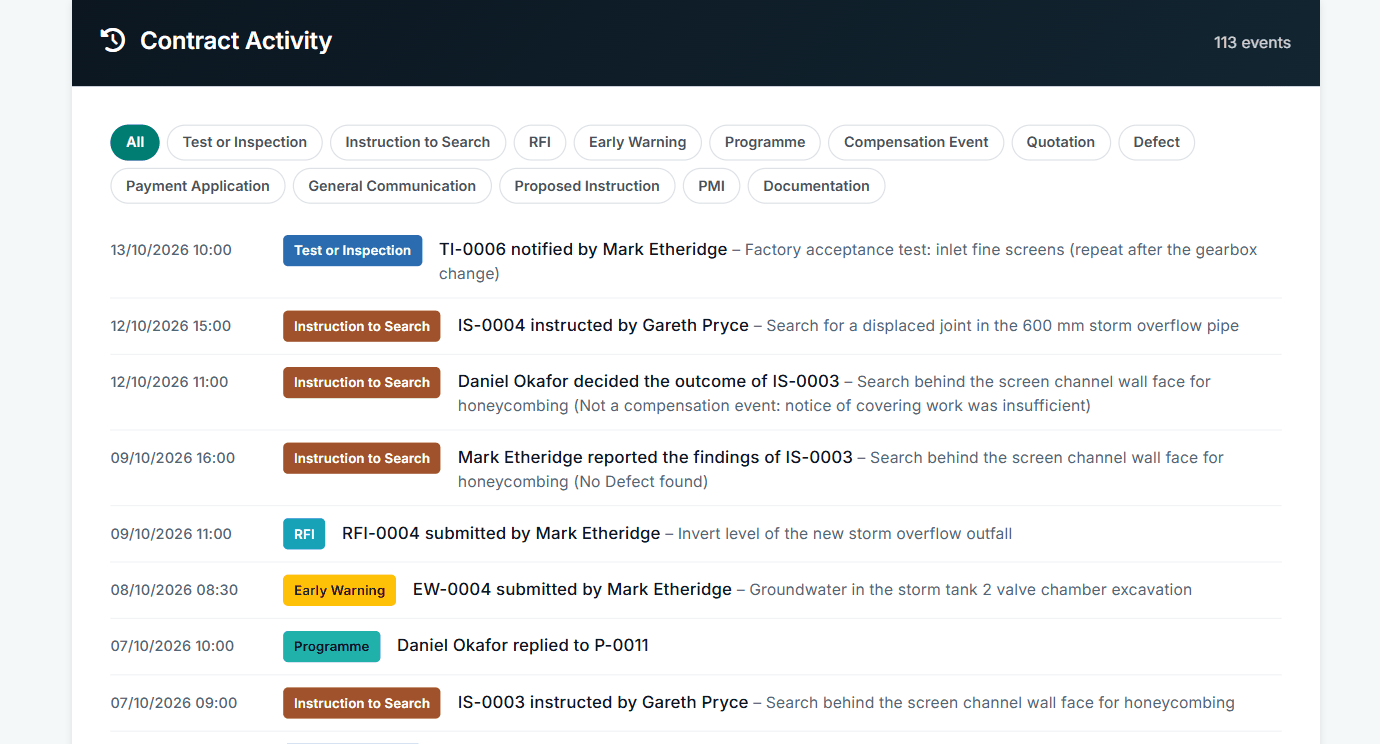
Contract Activity: every step, dated and named. See the worked example.
See how this works in practice
Click through Contract Status with sample contracts: raise the notice, reply to it, and watch both sides of one record.
Take the guided tour Book a demo
Get free NEC templates, use the free NEC tools or download free NEC templates.
This guide is general information in our own words, not legal advice. Your contract and its Contract Data always govern. NEC, NEC3 and NEC4 are trade marks of Thomas Telford Ltd; Contract Status is not affiliated with or endorsed by NEC.