
NEC clause 31 is the contract's main programme clause. It covers three things: getting a first programme in place (31.1), what a programme submitted for acceptance has to contain (31.2), and how the Project Manager answers (31.3). A fourth sub-clause, 31.4, applies only under some main Options.
The numbering is the same in NEC3 ECC and NEC4 ECC, but NEC4 adds two points to the content and the reply. This page gives the structure. The NEC programme guide shows how it connects to the rest of the contract.
Clause 31 by sub-clause
| Sub-clause | What it does | Who acts | Time limit | More detail |
|---|---|---|---|---|
| 31.1 | Requires a first programme, unless the Contract Data identifies one | Contractor | Period in the Contract Data | First programme |
| 31.2 | Lists what each programme submitted for acceptance shows | Contractor | None of its own | Contents checklist |
| 31.3 | Requires acceptance or reasons, and limits those reasons to four | Project Manager | Two weeks from submission (three under NEC4 ECS) | Acceptance and reasons |
| 31.4 | Links each activity on the Activity Schedule to the programme's operations | Contractor | With each programme | See below |
How NEC3 and NEC4 differ
| Point | NEC3 ECC | NEC4 ECC |
|---|---|---|
| Form of programme | Not dealt with in 31.2; a Client can add it through the Works Information | 31.2 says the programme is in the form the Scope states |
| Project Manager doesn't reply | A compensation event under 60.1(6), but the programme stays unaccepted | Also a compensation event, and the Contractor can start the route to treated acceptance |
| 31.4 | Options A and C | Option A; the Option C clause was removed |
| Terms | Employer, Works Information | Client, Scope |
Why 31.4 is easy to miss
31.4 sits in the Option clauses, not the core clauses, so anyone reading only the core section won't see it. Under Option A, the Contractor shows how the programme's operations map onto each entry in the Activity Schedule. There is a practical reason for this: payment under Option A depends on completed activities, so the Project Manager wants to see the two documents agree. Missing or unclear mapping leads to disputes about whether an activity has been completed. If you run a target contract, check which edition you are on before relying on it: the requirement appears in NEC3 Option C but not in NEC4 Option C.
How the sub-clauses work together
Clause 31 is linked to other parts of the contract, so a gap in one place tends to appear elsewhere:
- 31.1 and payment. With no first programme showing the required information, a 25% deduction from the Price for Work Done to Date applies (NEC4 50.5; NEC3 50.3).
- 31.2 and 31.3. Leaving out required information is a reason not to accept. An incomplete submission therefore starts a cycle of revisions instead of giving you a baseline.
- 31.3 and compensation events. A reason outside the permitted four can trigger 60.1(9), and a properly given reason means the Project Manager may assess later events itself (64.1, 64.2).
- 31.2 and the Client's obligations. Once accepted, dates shown for access and items the Client provides become part of the tests in 60.1(2) and 60.1(3).
- 31 and 32. Each revised programme goes through the same acceptance step, with the added content in clause 32.
What people get wrong
Applying clause 31 only to the first programme. The content list covers each programme submitted for acceptance, including every revision. A strong first submission followed by thin updates can be properly rejected at revision 5.
Reading "programme" as a Gantt chart. 31.2 asks for much more than bars and dates. It also wants provisions for float and time risk, the dates the Contractor needs things, and a statement of method and resources for each operation.
Assuming other forms match. Other NEC contracts handle the programme differently. Under the NEC4 Professional Service Short Contract, for instance, 31.1 deals with programmes sent as the Scope requires and there is no acceptance step. Under the NEC4 Term Service Contract the same clause numbers relate to a plan. Check the form you are actually using, and for the ECS see the longer periods above.
Related guides
- The NEC Programme: A Complete Guide
- What an NEC Programme Must Show
- Programme Acceptance and Reasons for Not Accepting
- Deemed Acceptance of a Programme Under NEC4
- What Is the Accepted Programme?
How this looks in Contract Status
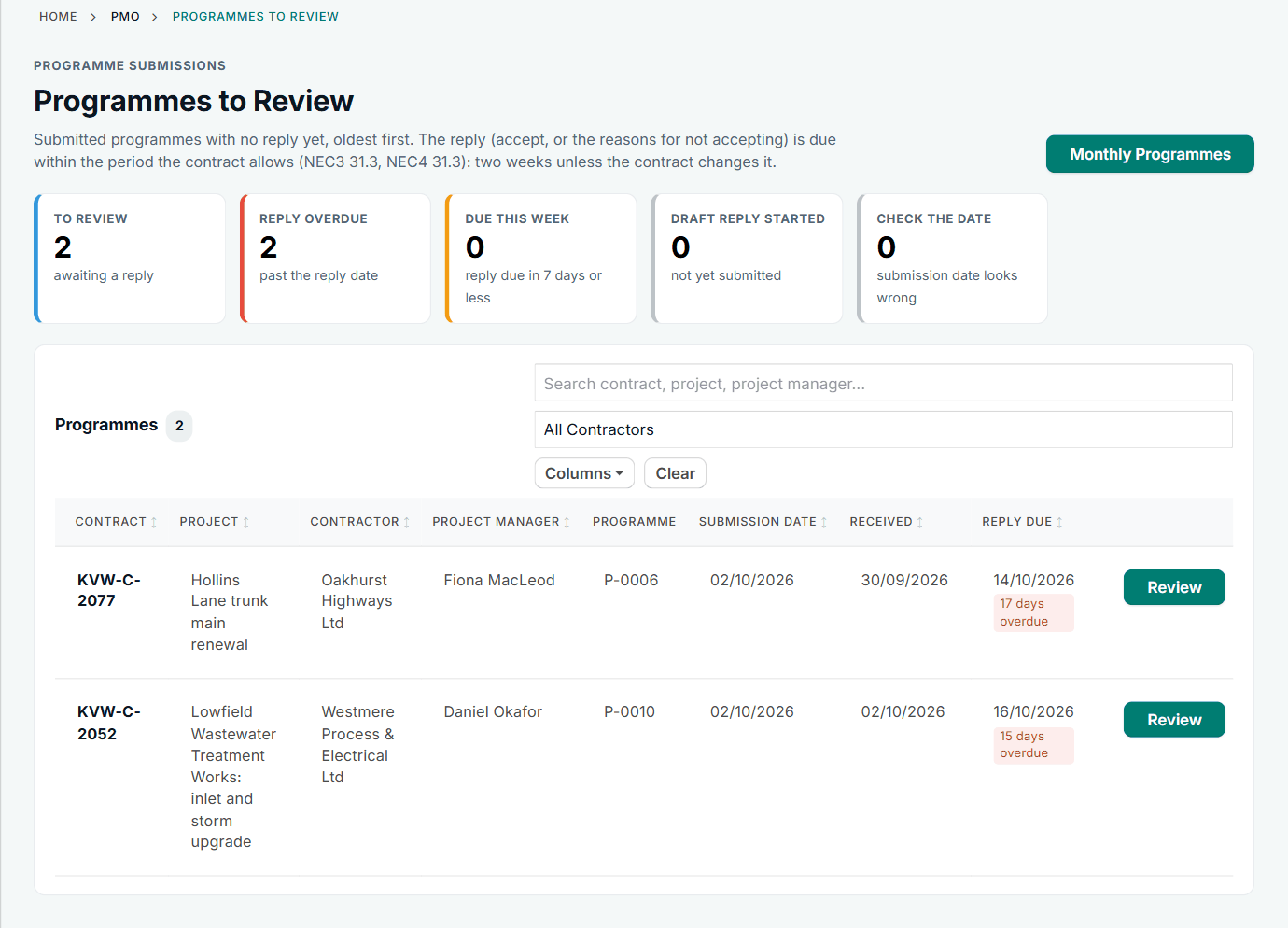
Programmes to Review, with the reply date for each. See the worked example.
See how this works in practice
Click through Contract Status with sample contracts: raise the notice, reply to it, and watch both sides of one record.
Take the guided tour Book a demo
Try the planner role-play, use the free NEC tools or download free NEC templates.
This guide is general information in our own words, not legal advice. Your contract and its Contract Data always govern. NEC, NEC3 and NEC4 are trade marks of Thomas Telford Ltd; Contract Status is not affiliated with or endorsed by NEC.