
Compensation event software should hold each event as one chain, from notification through quotation and reply to implementation, with a due date at every link. If it only stores a list of events with a status column, it will tell you what happened but won't warn you before a period runs out.
That chain is where a lot of an NEC contract's money gets decided. The NEC contract management software guide covers the wider picture; this page is about this one process, under the NEC4 ECC unless stated. If you are new to the mechanism, read what a compensation event is first.
What to look for
| Step | Standard ECC rule | What the software should do |
|---|---|---|
| Contractor notifies | Within 8 weeks of becoming aware (61.3) | Record the awareness date separately from the submission date, and warn when they are far apart |
| Project Manager replies | 1 week, or longer if the Contractor agrees (61.4) | Put the reply on the right person's list, and record agreed extensions on the record |
| Quotation submitted | 3 weeks from the instruction (62.3) | Link it to its event, with price, time and any changed Key Dates |
| Quotation answered | 2 weeks from submission (62.3) | Offer the three permitted outcomes: accept, instruct a revised quotation, or the Project Manager's own assessment |
| Revised quotation | 3 weeks from the instruction (62.4) | Keep every version, not only the last |
| No reply | After the failure notice, a further 2 weeks (61.4, 62.6, 64.4) | Count the period down and show who can act |
| Implemented | Clause 66 (NEC3 clause 65) | Update the Prices and dates once, from that event |
These periods can be changed by your Contract Data or Z clauses, so a system with fixed periods will be wrong for some contracts. Check that periods can be set per contract.
Five tests to run on any system
- Late notification. Enter an event with an awareness date nine weeks ago. Does anything show you it may be outside the 61.3 period? The bar doesn't apply to everything, so a warning is right and a hard block is not: events the Project Manager should have notified aren't barred.
- Extension. Agree an extra week on one quotation. Does the new date replace the old one for that record only? Under 62.5 an extension has to be agreed before the time has run out, so the date of the agreement matters.
- Silence. Let a reply lapse. Can you see what the Contractor may do next, and when deemed acceptance could arise?
- Project Manager's assessment. Choose the assessment route instead of accepting. Does the system start the time allowed under 64.3 and treat the outcome as an implemented event?
- Proposed instructions. Ask for a quotation for an instruction not yet given. Clause 65 in NEC4 and 61.2 in NEC3 handle this differently. Does the system keep it apart from a real event? See NEC4 proposed instructions.
What Contract Status does
Contract Status has separate Compensation Events and Quotations registers, and a quotation is added from its own event, so the two stay linked.
- Notifying. Choose the clause from your library's list, describe the event and its effects, and on the Contractor side record when you became aware of it. Contract Status uses that date to warn about the eight weeks.
- Replying. The reply form is on the record: request a quotation, or reject it with the reason.
- Quoting. The quotation holds the price, the delay to the Completion Date, changed Key Dates and the build-up.
- Answering. Accept, instruct a revised quotation with reasons, or make the Project Manager's own assessment.
- Late replies. Overdue records offer the Contractor side the notice that the reply is late. When the extra period has run out, either side can record the deemed acceptance.
- More time. One side can request an extension on the record, and the other accepts or refuses it. If accepted, it replaces the due date for that record only.
- The effect. The Completion Date and Key Dates in force change only when an event that moves them is implemented, and the Completion Date timeline shows each change and the event behind it.
It doesn't assess the event for you. Whether something is a compensation event, who caused it and what it is worth stays with the people running the contract.
What people get wrong when buying
- Buying a tracker for the commercial team only. The site team knows first, so a date of awareness typed in months later by a surveyor is weak evidence. Whoever notices needs a simple way to record it.
- Judging by the report. A tidy summary can sit on stale data. Ask where the status comes from, and whether a person has to update it.
- Waiting for the final cost. Software can't fix a habit of holding back notifications until the cost is known. The notification comes first and the quotation deals with the money. See notifying a compensation event.
To see this on one of your own events, including a late one, book a call.
Related guides
- NEC Contract Management Software
- Early Warning Register Software
- NEC Programme Approval Software
- NEC Payment Application Software
How this looks in Contract Status
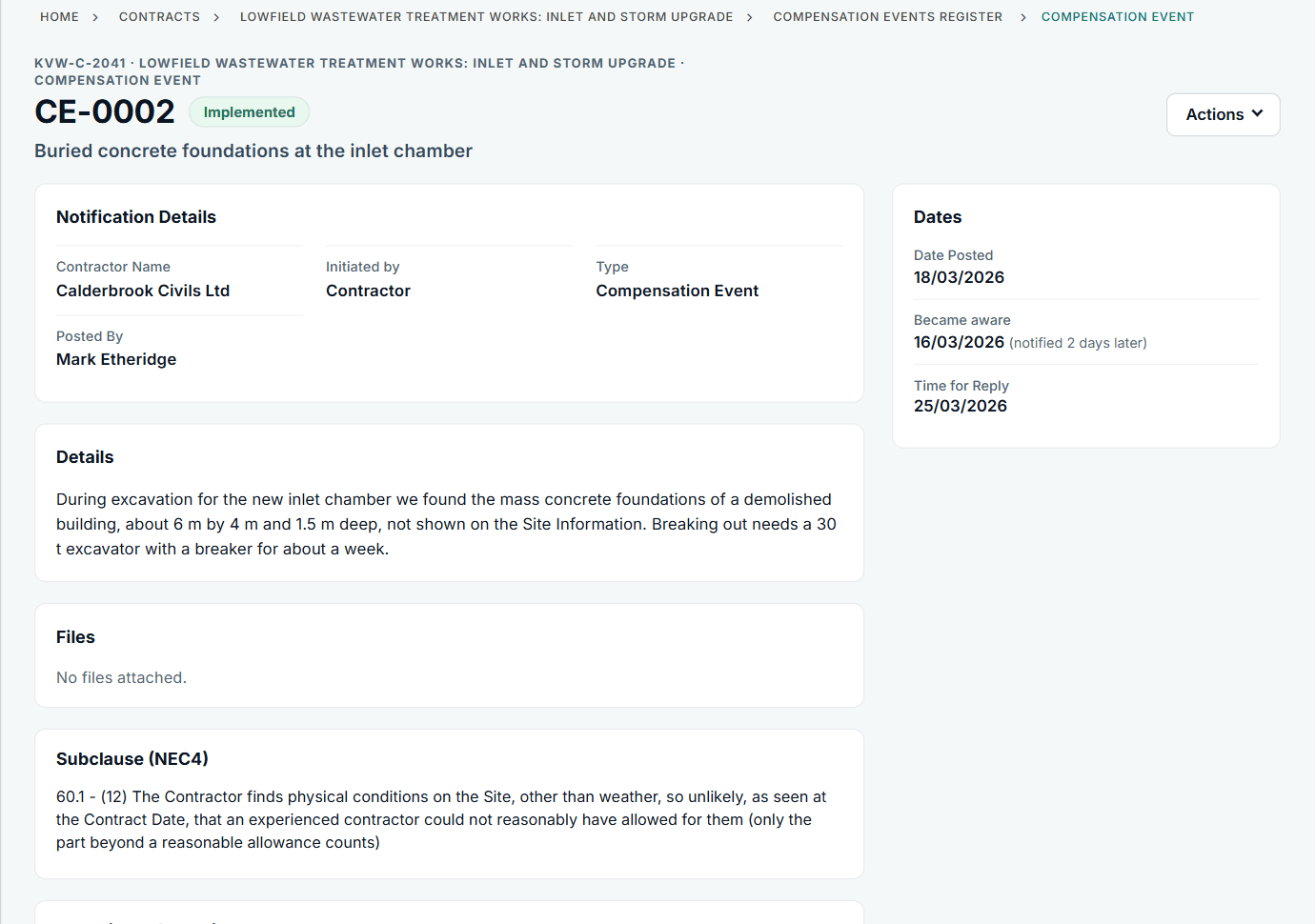
The record shows the date you became aware and how long you took to notify. See the worked example.
See how this works in practice
Click through Contract Status with sample contracts: raise the notice, reply to it, and watch both sides of one record.
Take the guided tour Book a demo
Test your NEC knowledge, use the free NEC tools or download free NEC templates.
This guide is general information in our own words, not legal advice. Your contract and its Contract Data always govern. NEC, NEC3 and NEC4 are trade marks of Thomas Telford Ltd; Contract Status is not affiliated with or endorsed by NEC.