
To notify a compensation event under NEC, send a separate written notice that identifies the event, says it is a compensation event and cites the sub-clause. The Project Manager notifies events it or the Supervisor caused; the Contractor notifies everything else, and it has eight weeks to do so.
This page uses NEC4 ECC. NEC3 ECC is the same on who and when, with the small differences noted. The wider compensation events guide explains what follows the notice.
Who notifies
| The event arises from | Who notifies | When | Clause |
|---|---|---|---|
| An instruction, notification, certificate or changed decision from the Project Manager or Supervisor | Project Manager | At the time of that communication | 61.1 |
| Anything else on the list, or a Project Manager's notice that never arrived | Contractor | Within eight weeks of becoming aware | 61.3 |
The clause doesn't ask for certainty. The Contractor notifies if it believes the event is a compensation event, and it can notify something it only expects to happen. If it turns out not to qualify, the Project Manager says so in its reply. Nothing is lost by being early, so don't wait until you are sure.
There is a final cut-off as well. NEC3 ECC stops notifications after the defects date (61.7). NEC4 ECC has a matching cut-off at 61.7, and its subcontract form ties it to the issue of the Defects Certificate, so check the wording in your contract.
What makes a good notice
The contract sets out very little about the content of a Contractor's notice. Clause 13 asks for communications that are readable, can be copied and leave a record, and that a notification is sent separately from other communications (13.7). Beyond that, a useful notice answers the questions the Project Manager has to decide. A checklist:
- A clear heading saying it is a notification of a compensation event.
- Contract name and your reference number.
- The sub-clause relied on, for example 60.1(3). Add an alternative if more than one might apply.
- What happened or is expected to happen, in facts, with the location.
- The date you became aware of it. This starts the eight weeks, and it is better recorded by you than argued over later.
- A reference to the Accepted Programme where a date on it matters.
- A reference to any early warning you gave, if there was one.
- An initial view of the effect: Defined Cost, Completion, a Key Date. Don't quote a price, since it isn't asked for at this stage.
A ready-made format is in the compensation event notice template.
A short example
The fictional contract below shows how little is needed. Your own will have its own references.
It is about 70 words and does the job. It names the clause, the fact, the date and the expected effect. Argument about the amount comes later.
What goes wrong
- Relying on a site diary or a meeting minute. A mention in a minute isn't a separate notification. Clause 13.7 is there for that reason.
- Treating an early warning as the notice. A warning and a notification do different jobs. See early warnings and compensation events.
- Sending it to the wrong place. Use the address and any system the contract specifies. A notice to a site engineer's inbox can be challenged.
- Assuming the Project Manager will notify. The Project Manager should notify events it causes, and often doesn't. The Contractor can do it instead, and should keep its own record.
- Bundling. A single letter covering five unrelated events makes it hard to track five separate clocks. Use one notice for each event.
What happens next
If the Contractor notified, the Project Manager has one week to decide, as clause 61.4 explains. If it agrees, or it is the one notifying, the notice comes with an instruction to quote. Log the date of everything you send and receive in a compensation event register, so that you have the facts if a time limit is later questioned.
Related guides
- NEC Compensation Events: The Complete Guide
- Clause 61.1: Project Manager Notification
- Clause 61.3: The Eight-Week Time Bar
- Clause 61.4: Project Manager Decision
- The Full List of NEC3 ECC Compensation Events
- The Compensation Event Process Step by Step
How this looks in Contract Status
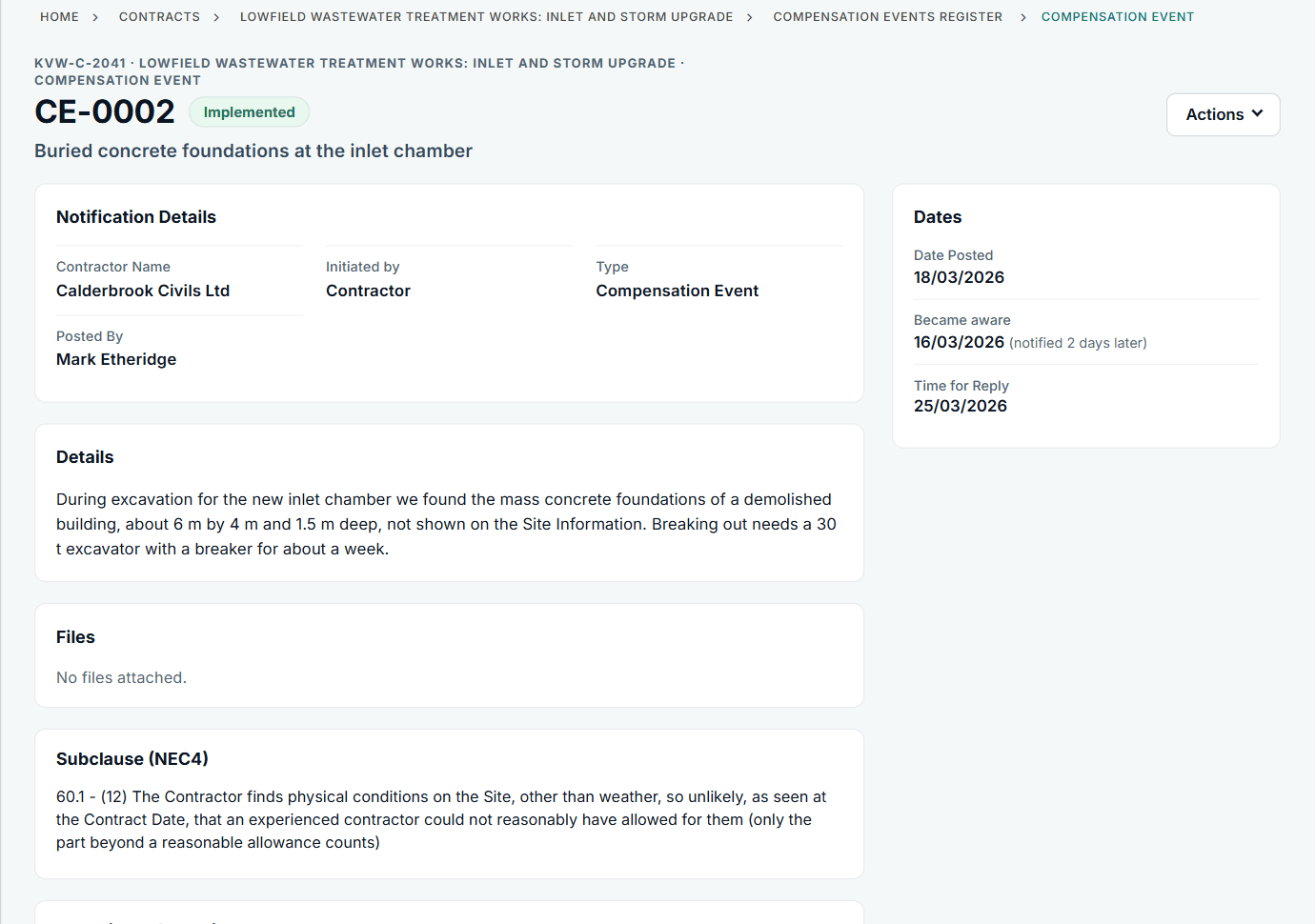
The record shows the date you became aware and how long you took to notify. See the worked example.
See how this works in practice
Click through Contract Status with sample contracts: raise the notice, reply to it, and watch both sides of one record.
Take the guided tour Book a demo
Take the NEC4 ECC quiz, use the free NEC tools or download free NEC templates.
This guide is general information in our own words, not legal advice. Your contract and its Contract Data always govern. NEC, NEC3 and NEC4 are trade marks of Thomas Telford Ltd; Contract Status is not affiliated with or endorsed by NEC.