
Payment application software for NEC should work from the assessment date, not from an invoice date, and it should show the certificate, the pay less deadline and the final date for payment for every cycle. A general invoicing or accounts tool won't do that, because it doesn't know the contract's payment sequence.
This page sets out what to check, using the NEC3 and NEC4 ECC with Option Y(UK)2, and what Contract Status does. For the wider buying picture see the NEC contract management software guide. For the contract rules, the NEC payment guide and assessment date explainer go further.
The dates a system has to show
With the standard periods under the ECC and Option Y(UK)2, one cycle looks like this:
| Day | What happens | Clause |
|---|---|---|
| Before day 0 | The Contractor's application goes in | Clause 50 |
| Day 0 | Assessment date; the Project Manager assesses the amount due | 50.1 |
| By day 7 | Payment certificate; the payment also becomes due, seven days after the assessment date | 51.1, Y(UK)2 |
| Day 14 | Last day for a pay less notice, seven days before the final date for payment | Y(UK)2 (Y2.3 in NEC3) |
| Day 21 | Final date for payment | 51.2, Y(UK)2 |
Your Contract Data and any Z clauses decide the real periods, including the assessment interval. So the first thing to test is whether the system can hold different dates per contract, and whether changing them is an admin task rather than a software change.
What to look for
- Assessment dates set up front. Applying late can matter: the Project Manager need only consider applications in by the assessment date. The dates should be visible to whoever prepares the application.
- A clear link from application to certificate. Both sides should see what was applied for and what was certified, on the same record.
- Pay less handled correctly. A pay less notice states the sum now considered due. It replaces the certified sum; it isn't taken off it. A system that subtracts the notice figure from the certificate gives you the wrong payment, and this is worth testing directly.
- The basis stays with the amount. The certificate needs the details of how it was assessed, and a pay less notice needs its basis. Check these are stored with the record.
- Clear separation of Options. The amount due is built differently under Options A and B than under cost-based Options C, D and E. See the main Options. Ask how the system handles your Option rather than assuming.
What Contract Status does
- Set the dates. An administrator sets assessment dates for the account or for one contract. The contract and payment pages then show the next assessment date and the certificate date.
- Apply. The Contractor side adds a payment application with the amounts and files, and submits it before the assessment date.
- Certify. The Client side issues the payment certificate on the application.
- Pay less, if needed. The Client side issues a pay less notice before the deadline, with the sum it considers due and the basis.
- Follow it. The register and summary show what was applied for, certified and is due.
It records and tracks the steps. The judgement about what is due under your Option stays with your team.
An example of what goes wrong
A fictional NEC4 Option A contract, with illustrative figures. On a Y(UK)2 cycle with standard periods, the certificate says £120,000. On day 17 the Client decides a section of work is defective and it should only pay £95,000. The last day for a pay less notice was day 14.
The deadline has passed, so the notified sum generally has to be paid and the dispute over £25,000 follows separately. Had the notice gone in on time, it would have stated £95,000 as the sum due, and not £25,000 as a deduction. Software can't make the commercial decision on day 17 any earlier. It can show on day 10 that the window is closing on a certificate someone has concerns about. See pay less notices under NEC for more detail, and take advice on your own facts, since the Construction Act also applies.
Questions for a demonstration
- Show me a contract where the period to the final date for payment differs from the standard.
- Show me a pay less notice issued after a certificate, and which figure then counts as payable.
- Show me what a commercial manager sees across several contracts on one assessment date.
- Show me a contract with no programme identified in the Contract Data, where the assessment holds back a quarter of the value until the first programme arrives. How would I handle that here?
To run those questions against Contract Status with your own payment periods, book a call.
Related guides
- NEC Contract Management Software
- NEC4 Contract Software
- NEC3 Contract Software
- Contract Administration Software for Construction
- Early Warning Register Software
- NEC Programme Approval Software
How this looks in Contract Status
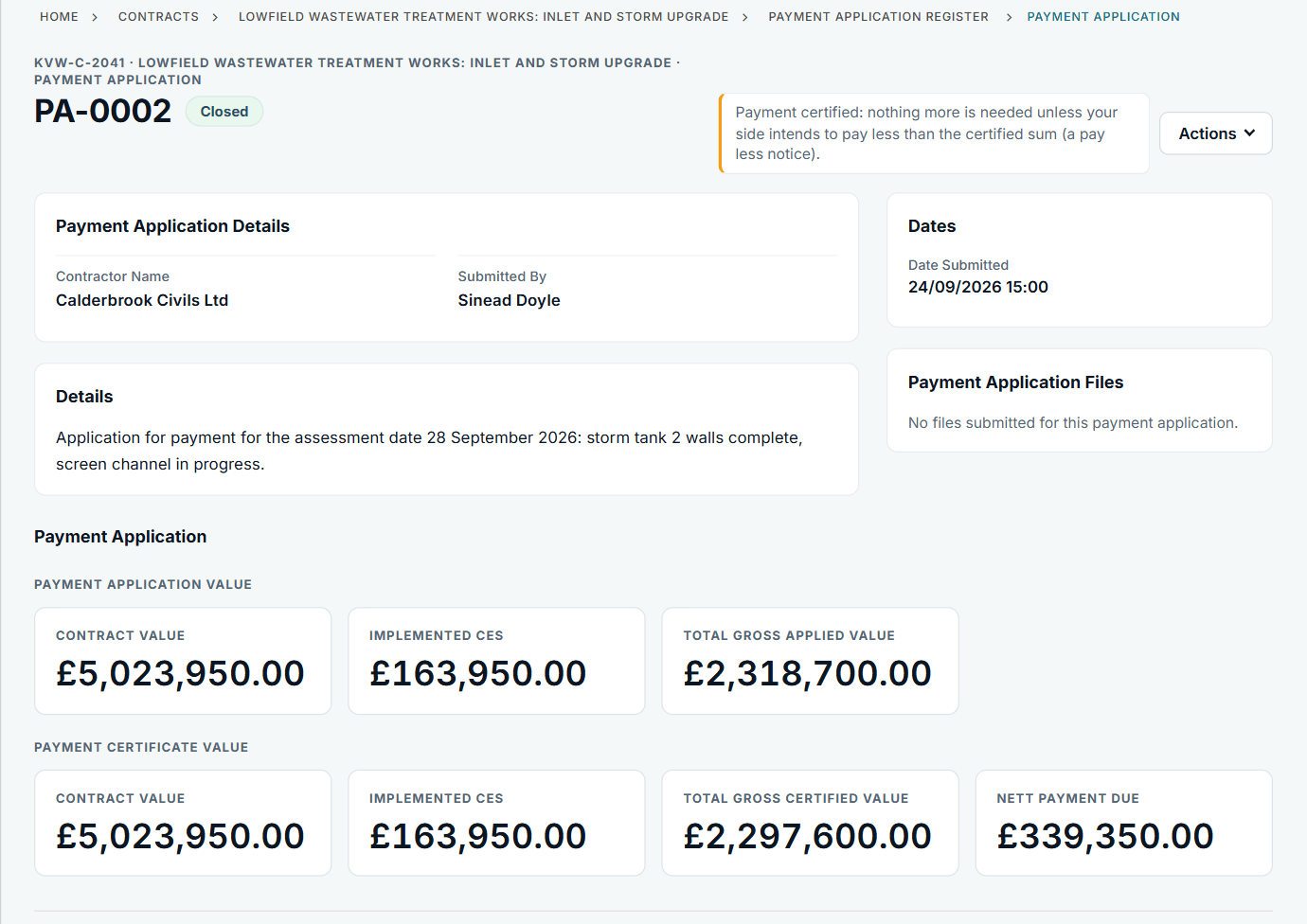
Applied and certified figures together on one record. See the worked example.
See how this works in practice
Click through Contract Status with sample contracts: raise the notice, reply to it, and watch both sides of one record.
Take the guided tour Book a demo
Test your NEC knowledge, use the free NEC tools or download free NEC templates.
This guide is general information in our own words, not legal advice. Your contract and its Contract Data always govern. NEC, NEC3 and NEC4 are trade marks of Thomas Telford Ltd; Contract Status is not affiliated with or endorsed by NEC.