
Early warning software should build the register from the warnings themselves, then carry each one through meetings, decisions and owned actions until it comes off the register. A spreadsheet with a risk score does part of that, but it doesn't show who was told when, or which actions are overdue.
This page covers what to check when you are buying and how Contract Status handles it. It sits under the wider NEC contract management software guide. For the contract rules behind it, see NEC4 clause 15 and the Early Warning Register.
What the register has to reflect
| NEC4 ECC | NEC3 ECC | |
|---|---|---|
| Duty to warn | 15.1 | 16.1 |
| Name of the register | Early Warning Register | Risk Register |
| Name of the meeting | Early warning meeting | Risk reduction meeting |
| First register | Within 1 week of the starting date (15.2) | No fixed period |
| First meeting | Within 2 weeks of the starting date (15.2) | No fixed period |
| Revised register after a meeting | Within 1 week of the meeting (15.4) | No fixed period (16.4) |
| Reply to a warning | No NEC period | No NEC period |
If you run both editions, the words shouldn't be a global setting. A team on an NEC3 highways scheme and an NEC4 water scheme should each see the right name on the right contract. See the NEC3 Risk Register for how the older version works.
What to look for
- A warning is its own record. It has a raiser, a date and the matter's likely effect on the Prices, Completion, Key Dates and performance. A row added to a master list loses the moment it was given.
- Either side can raise one. Under the ECC both the Contractor and the Project Manager have the duty. A system where only one party has access gets one side's risks.
- Meetings connect to warnings. You should be able to pick which warnings a meeting covers, then record decisions against those warnings.
- Actions have an owner and a date. This is what makes it a management tool rather than an archive.
- The revised register is an issued event. Under NEC4 it is due within a week of each meeting, so the system should show that it is still waiting.
- It doesn't blur warnings and compensation events. A warning isn't notice of a compensation event. If the matter is one, the eight weeks in 61.3 still runs, and the two records should be separate.
What Contract Status does
- Raise it. Describe the matter and its likely effect and save it as a draft, which only your company can see.
- Issue it. On submitting, the other side is e-mailed and sees it in their notifications.
- Respond. The other side replies on the record or starts a discussion. The reply records their view; it doesn't accept or reject the warning, because NEC has no such step.
- See the register. Early Warning Register & meetings (Risk Register on NEC3 contracts) lists each warning with its risk, latest decision and actions.
- Meet. Request a meeting with when, where, who and which warnings. Prepare it, then record the notes, decisions and actions, each with an owner and a date.
- Issue the revised register. The Client side issues it, and until then it stays on that side's Action List.
Contract Status does put a two-week reply date on an early warning, but it isn't a contract period. It is a management target, set in your administrator's reply periods, so a late reply on a warning doesn't carry the consequences of a late reply on a quotation. Any system should make that distinction clear.
A test to run: the week after the meeting
A fictional NEC4 contract for a footbridge. At the Tuesday meeting the team discusses a warning about late steel. They decide to re-sequence the deck work, so the Scope needs to change. Ask the system to show you, one week later:
- whether the revised register has gone out, and when;
- who owns the re-sequencing action, and whether it is overdue;
- whether the Project Manager's instruction changing the Scope was issued with the register;
- what each warning's status was at the previous meeting.
If answering takes a search through minutes and e-mails, the tool is storing the register, not running it. Bring your own version of this scenario if you book a call.
What people get wrong
- Scoring risks instead of managing them. Probability and impact matrices are useful to some teams, but NEC asks for something simpler: raise the matter, meet, and decide who does what. Don't let a scoring screen delay a warning.
- Letting the register go stale. If only one person can update it, it falls behind as soon as they go on leave. Check how much is updated by the records themselves.
- Keeping only the current state. If a warning's history can be overwritten, the system won't help you show who knew what and when. That can matter later: missed early warnings can reduce what a compensation event is worth.
Related guides
- NEC Contract Management Software
- NEC Programme Approval Software
- NEC Payment Application Software
- NEC4 Contract Software
- Compensation Event Software
How this looks in Contract Status
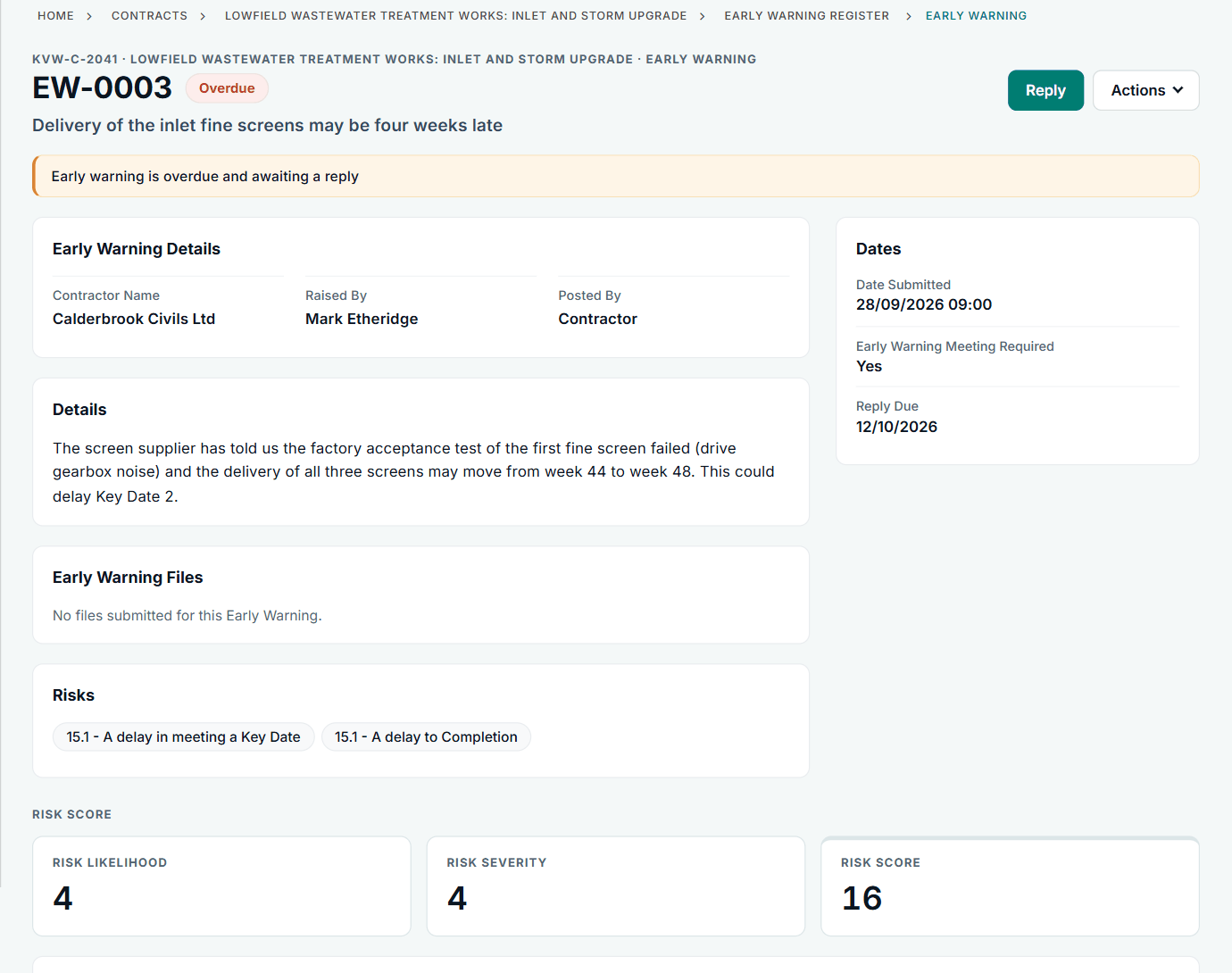
An early warning in Contract Status, with its risks, reply date and score. See the worked example.
See how this works in practice
Click through Contract Status with sample contracts: raise the notice, reply to it, and watch both sides of one record.
Take the guided tour Book a demo
Test your NEC knowledge, use the free NEC tools or download free NEC templates.
This guide is general information in our own words, not legal advice. Your contract and its Contract Data always govern. NEC, NEC3 and NEC4 are trade marks of Thomas Telford Ltd; Contract Status is not affiliated with or endorsed by NEC.