
Quantity surveyors use NEC software to stop losing time to the paper around the sums: which quotation is current, what it was based on, when the reply is due, and what was certified. NEC software for quantity surveyors won't price anything for you, and the build-up still comes from your own records and judgement.
The reason for caring is that NEC ties the money closely to the facts and the dates of each event. This page looks at it from both surveyors' seats, the Contractor's and the Project Manager's, under the NEC4 ECC with NEC3 notes. It is part of the NEC contract management software guide, and the role is described in the quantity surveyor under NEC.
What each compensation event should have behind it
Use this as a checklist, whichever tool you work in. If you can't find one of these within a few minutes on a live event, that is a sign of where the problem lies.
- The event. The clause it falls under, and what happened, in a sentence that a stranger could follow.
- The dates. Date of awareness, date notified, date of the Project Manager's reply. Under 61.3 the first of these decides the entitlement.
- The dividing date. Under NEC4 63.1, cost before it is actual and cost after it is forecast. It depends on the type of event, so write it down. NEC3 works differently.
- The Accepted Programme used. Name the revision and the date. The delay in 63.5 is measured against the programme current at the dividing date.
- The Defined Cost build-up. Components such as People, Equipment, and Plant and Materials, split as actual or forecast, with a note of the rates used. On Options A and B this uses the Short Schedule of Cost Components, unless your contract says otherwise.
- The assumptions. If the Project Manager has stated any, so that a later correction can be traced.
- Early warning. Whether one was given. If the Project Manager says an experienced contractor could have warned (61.5), the event is assessed as if it had.
- Every version. Each revised quotation (62.4), with the Project Manager's reasons for asking for it.
The Accepted Programme revision is the one most often missing. It is also the one people argue about later, so it is worth checking how a system ties a quotation to a revision. Assessing compensation events goes through the rules, and quotations for compensation events covers the form.
The Contractor's QS and the Project Manager's QS want different things
| Contractor's surveyor | Project Manager's surveyor | |
|---|---|---|
| Main dates | The 8 weeks (61.3), the 3 weeks to quote (62.3), the assessment date | The 1 week (61.4), the 2 weeks to reply (62.3), the 1 week to certify (51.1) |
| The main risk | An event barred or assessed by someone else | A quotation treated as accepted (62.6) |
| What they want to see | Replies now late, and the total not yet implemented | Quotations by age and size, and their own overdue assessments |
| Own assessments | What triggered it (64.1), and how far it differs from the quotation | A clear basis, and the time allowed (64.3), with no drift |
| Payment | Application before the assessment date | Certificate with the detail of how it was assessed, and any pay less notice in time |
A tool that only suits one of these isn't necessarily wrong, but try it from both seats.
What a system takes off you, and what it doesn't
The part it can take is the admin: dates, lists, finding the last version, producing routine letters, and rebuilding the monthly summary of events by status. It shouldn't take the commercial work, and any supplier who says it does hasn't priced a compensation event.
In Contract Status, a quotation is added from its own compensation event, so the two stay linked. It holds the price, the delay to the Completion Date, any changed Key Dates and the build-up. A pay less notice's amount becomes the nett payment due once submitted, so it replaces the certified sum rather than being deducted from it. That is the kind of detail to test on any tool, because a surveyor will notice at once if it's wrong. Your valuation and your cost records stay in your own systems.
So these still need you:
- The cost ledger. Clause 52 sets out the records for Options C, D and E: accounts of what was paid and proof it was paid, what was said and assessed on subcontractors' compensation events, and anything further the Scope asks for. Those live in your accounts system and on your site. See clause 52.
- Allocating cost to events. If your cost codes can't separate event work, no contract system can help you afterwards. Set up the code when the event is notified.
- Judging the forecast. A forecast of work yet to be done is an opinion with reasons, on both sides.
- Disallowed Cost reviews. These are judgement applied to invoices and ledgers. See Disallowed Cost.
Three mistakes surveyors make when choosing
- Assuming the commercial team is the only user. Your dates begin on site. If site staff don't use it, your awareness dates will be weak.
- Not testing an amended contract. Try a period changed by a Z clause, and a pay less notice issued after a certificate, on a live-looking contract. The payment application software page has more questions to ask.
- Treating it as a substitute for a commercial report. A list of events isn't a view on where the job will finish. That still takes a surveyor to write.
Related guides
- NEC Contract Management Software
- Why Subcontractors Use NEC Contract Software
- Managing Many NEC Contracts Without Losing Track
- How Good Records Reduce NEC Disputes
- Why Contractors Use NEC Contract Software
- Why Clients Use NEC Contract Software
How this looks in Contract Status
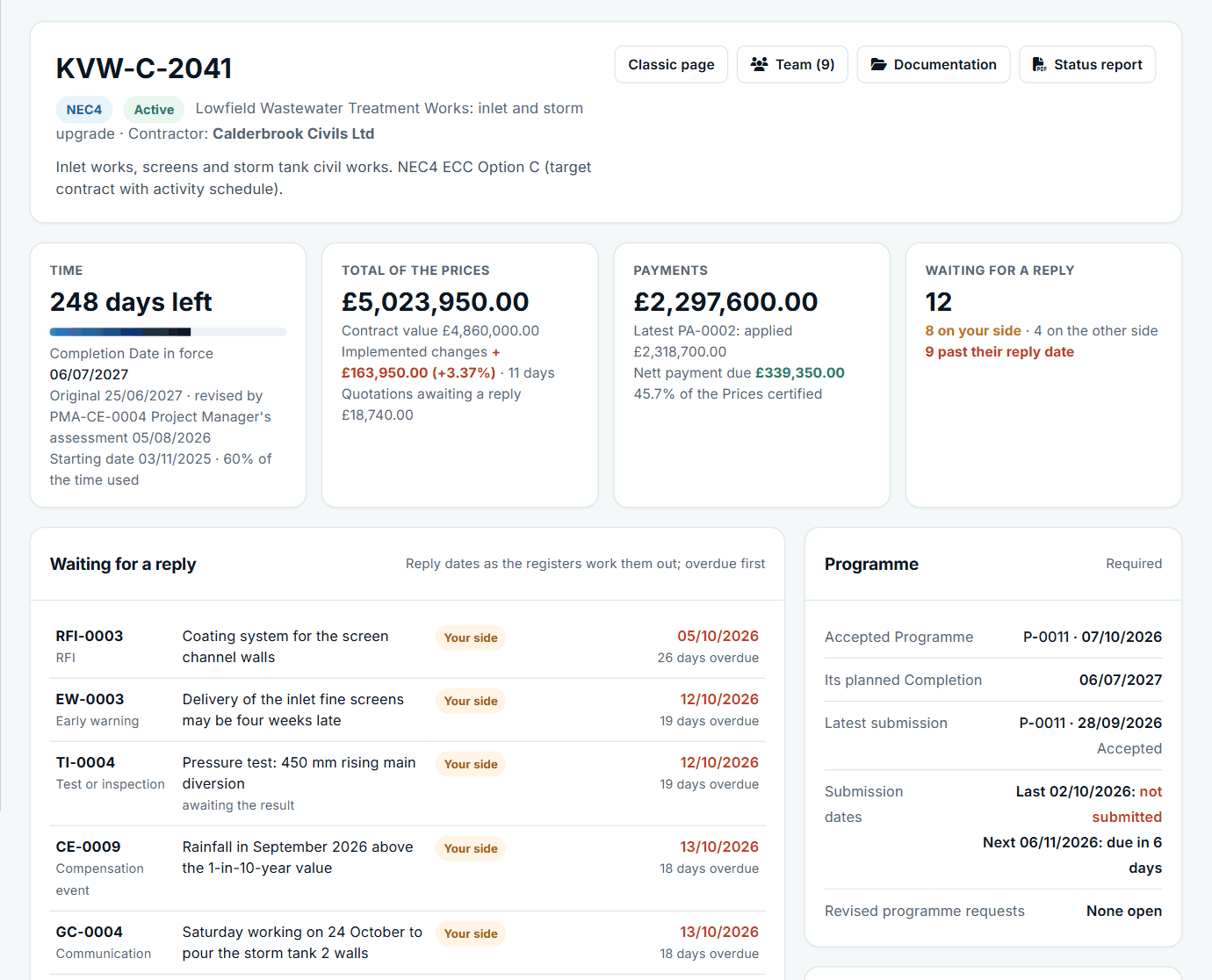
A contract at a glance: time, the total of the Prices, payments and replies waiting. See the worked example.
See how this works in practice
Click through Contract Status with sample contracts: raise the notice, reply to it, and watch both sides of one record.
Take the guided tour Book a demo
Test your NEC knowledge, use the free NEC tools or download free NEC templates.
This guide is general information in our own words, not legal advice. Your contract and its Contract Data always govern. NEC, NEC3 and NEC4 are trade marks of Thomas Telford Ltd; Contract Status is not affiliated with or endorsed by NEC.