
NEC time bar software helps by turning the eight weeks in clause 61.3 into a visible date with an owner, instead of something a surveyor works out when the event reaches them. It can't start that clock for you. The bar runs from when the Contractor became aware that the event happened, and no system knows that until a person records it.
So a tracked deadline changes less than the sales pitch suggests, and more than a sceptic might expect. This page explains where, for the NEC4 ECC, with notes on NEC3 and the subcontract. It is part of the NEC contract management software guide. For the rules themselves, see clause 61.3: the eight-week time bar and NEC time bars explained.
Where the time really goes
Consider a fictional NEC4 Option A contract with illustrative dates. A gang finds an old concrete footing on 3 March.
| Date | What happens | Who knows | Weeks left of eight |
|---|---|---|---|
| 3 March | Footing found. The foreman works round it and mentions it in the site diary. | Foreman | 8 |
| 17 March | The site manager mentions it on a call, thinking the delay can be absorbed. | Foreman, site manager | 6 |
| 14 April | The cost of breaking out comes through. The site manager tells the surveyor. | Surveyor, at last | 2 |
| 24 April | The surveyor, after waiting for one more invoice, notifies. | Project Manager | Under 1 |
| 28 April | Last day for a notice, on this date of awareness. | 0 |
A tracked deadline only helps from 14 April in that story, unless the first step changes. Six weeks went before anyone with an interest in the date heard about it. That is why a useful system has to be simple enough for site staff to record the event when they see it, and why the surveyor shouldn't wait for a final cost. The notice comes first, and the quotation deals with the money.
What a tracked deadline changes, and what it doesn't
| It can | It can't |
|---|---|
| Hold the date of awareness separately from the date of the notice | Know when you actually became aware |
| Warn you when those two dates are far apart | Decide whether the bar applies. An event arising from an instruction, a notification, a certificate or a changed decision of the Project Manager or Supervisor isn't caught. |
| Show the reply now due on the other side, and who has it | Decide that the event is a compensation event |
| Keep the date a notice was submitted on the record | Make a late notice on time |
| Hold a different period for a subcontract or a Z clause | Know the period has changed unless someone enters it |
A warning is the right behaviour, not a block. Because of the exceptions, a system that refused a notice past eight weeks would stop some valid ones. The surveyor's judgement on a late event still matters.
Other clocks that are easily confused with it
The word "time bar" is used loosely, and that causes poor prioritising. Clause 61.3 removes the change to the Prices and dates. Most of the other periods have different consequences. A late quotation lets the Project Manager assess instead (64.1). A late reply from the Project Manager is itself a compensation event (60.1(6)), and may open the route to treated acceptance. A missed early warning can reduce what the event is worth (61.5) without barring it.
A system that shows all of them identically in red doesn't help anyone decide what to do first. Ask how any tool separates contract periods from management targets. Contract Status, for example, puts a two-week reply date on an early warning as a management target and says that NEC sets no such period.
Dates that differ by contract
- NEC3 and NEC4. Both have eight weeks in the ECC, but NEC4 measures from awareness that the event has happened, and the exceptions are worded differently. Check your edition before relying on an exception.
- Subcontracts. The NEC4 ECS gives the Subcontractor seven weeks, not eight. A tool with one fixed period gets this wrong. See a subcontractor notifying late.
- Z clauses. Amended contracts often change these periods. The contract you signed decides, so the first check is whether the system can hold a period per contract.
A routine that makes the tool worth having
- Ask every site meeting one question: has anything happened that we haven't told the commercial team about?
- Record the date of awareness when the event is raised, even if you have no idea of the cost.
- Review open items weekly by whose turn it is, not by date raised.
- When a notice looks late, stop and check for an exception before you assume the entitlement has gone. See what to do after missing the eight weeks.
- When in doubt on a real sum, take advice. Whether a bar applies can be a legal question.
Related guides
- NEC Contract Management Software
- Avoiding Treated Acceptance by Keeping Replies on Time
- Why an NEC Contract Needs a Single Audit Trail
- Why Email Is a Poor Way to Run an NEC Contract
- The Benefits of NEC Contract Management Software
- Do We Actually Need NEC Software?
How this looks in Contract Status
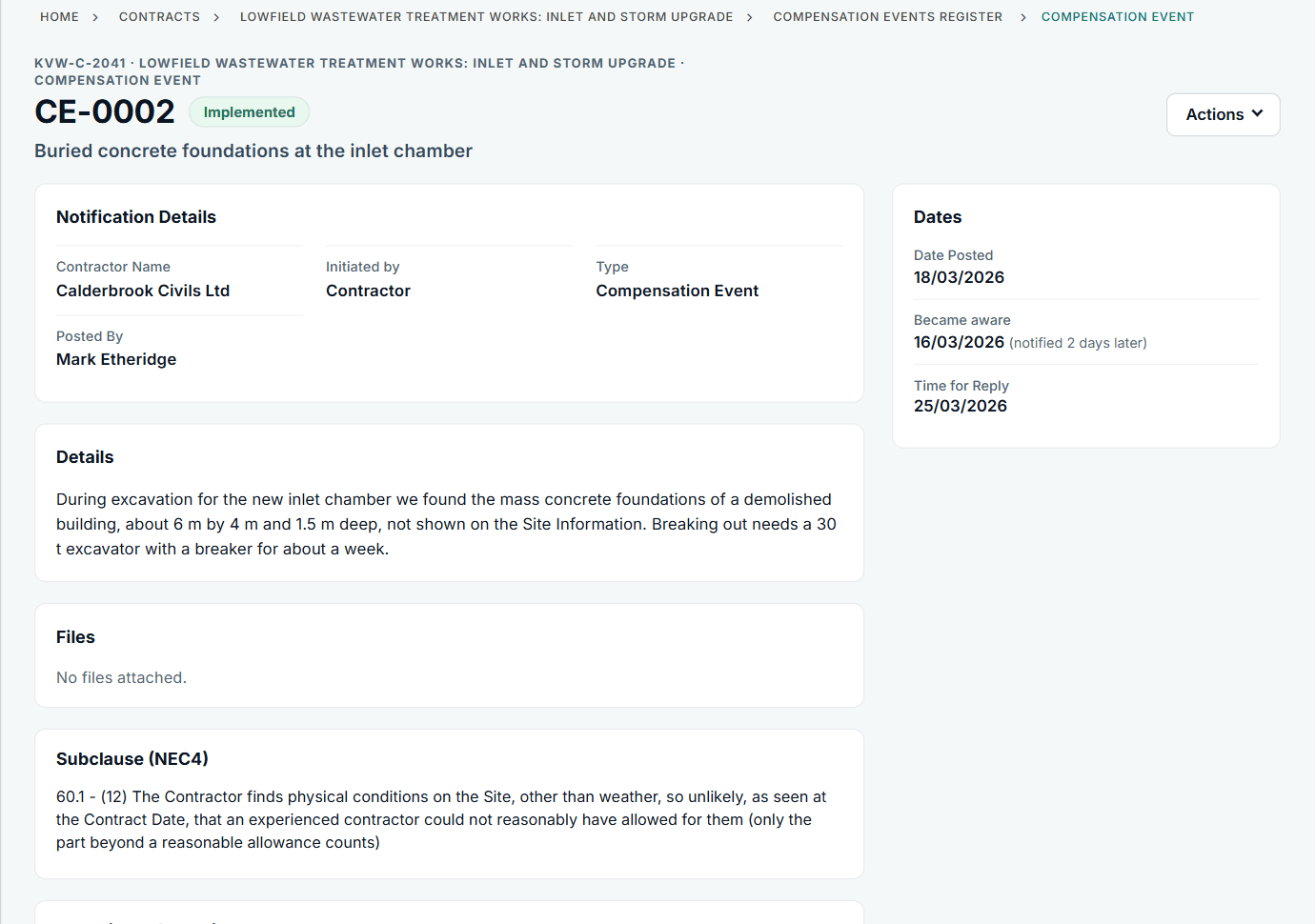
The record shows the date you became aware and how long you took to notify. See the worked example.
See how this works in practice
Click through Contract Status with sample contracts: raise the notice, reply to it, and watch both sides of one record.
Take the guided tour Book a demo
Test your NEC knowledge, use the free NEC tools or download free NEC templates.
This guide is general information in our own words, not legal advice. Your contract and its Contract Data always govern. NEC, NEC3 and NEC4 are trade marks of Thomas Telford Ltd; Contract Status is not affiliated with or endorsed by NEC.