
Managing multiple NEC contracts comes down to a split that's easy to get wrong: some things have to differ on every contract, and others should be identical on all of them. Keep the rules per contract and the method common, and a commercial manager can read any job quickly. Mix them up, and either dates go wrong or nothing compares.
This page sets out that split and a simple way of reviewing a portfolio, with or without software. It forms part of the NEC contract management software guide.
What should differ, and what shouldn't
| Has to follow each contract | Should be the same everywhere |
|---|---|
| Edition: NEC3 or NEC4, and the words that go with it | The stages an event moves through, and what each status means |
| Form: ECC, ECS, or a short or professional service form | How you number and name records |
| Main Option, which decides what the money means | What a monthly report contains |
| Periods for reply and any others in the Contract Data | Who reviews what, and how often |
| Z clauses and their effect on clauses | What happens when a failure notice arrives |
| Payment dates and the assessment interval | Where site staff record a new event |
The classic mistake in a shared template is to put a rule in the common column. Someone sets up a master tracker with two weeks for quotation replies and copies it to a subcontract where the period is four. Or the word "Risk Register" appears on an NEC4 job. Each looks small, but people stop trusting the tool once they find one wrong date.
The other mistake is the reverse. Each project invents its own status words, so "closed" means implemented on one job and rejected on another, and no roll-up can ever be right.
What a mixed book actually looks like
Here is one fictional organisation's live contracts. It isn't unusual, and it shows why a single rule set fails.
| Contract | Form | Early warnings | Unanswered programme | Implemented under |
|---|---|---|---|---|
| Highway junction | NEC3 ECC, Option C | Clause 16, Risk Register | A compensation event | Clause 65 |
| Water treatment upgrade | NEC4 ECC, Option E | Clause 15, Early Warning Register | Can be treated as accepted (31.3) | Clause 66 |
| Groundworks package | NEC4 ECS | Clause 15, with the Contractor in the Project Manager's place | Three weeks to reply, not two | Clause 66 |
| Design services | NEC4 PSSC | Numbered differently | Check the form: the ECC rules don't carry over | Check the form |
A commercial manager with these four needs one view of what's late, while each date is worked out by that contract's own rule. See NEC3 vs NEC4 and NEC contract types for the differences.
A monthly portfolio review
Keep it short, and look at exceptions only. A review that takes all morning stops happening.
- What's overdue on our side, on any contract? Assign each to a person before the meeting ends.
- Have any failure notices arrived or gone out? These deserve a named response whichever side you are on.
- Which events are oldest at each stage? Age, more than number, shows where decisions are getting stuck.
- Which contracts have no recent entries? A silent register can be a healthy job, or a team that has stopped recording. Ask which.
- Which contracts have an out-of-date Accepted Programme, or none? Every assessment on that job is harder until that's fixed. See when there is no Accepted Programme.
- What's the unimplemented total on each? Keep it at contract level. Only add it up if the Options allow a meaningful sum, because a figure across Option A and Option E contracts means little.
The NEC reporting guide has more on content for each contract.
What to check in a system
- Company defaults that a contract can override. A new contract should start from your standard periods, and each one should be able to change its own without affecting the others. Contract Status works this way: new contracts take your defaults, each can have its own on the contract, and an extension agreed on a record changes that record only.
- Wording and rules by edition, so that the NEC4 job says Early Warning Register and the NEC3 job says Risk Register, with the right clause on each.
- Amended clauses in one place. If your organisation has a standard set of Z clauses, you don't want to re-enter them for every job.
- An honest view of what hasn't been set up. On a portfolio, one contract with unconfirmed periods can quietly give you wrong dates. Showing "unknown" is better than showing fine.
- Access by contract and by role. Separate teams and separate other Parties shouldn't see each other's work.
Where consistency can go too far
Standardising your process doesn't entitle you to standardise the contract. A company procedure can't shorten a period for reply, or change what the other Party has agreed to. If your common process says something the contract doesn't, the contract decides. Equally, a team on a simple job shouldn't have to complete everything a large framework contract needs. Agree a small required core, and let the rest be optional.
And none of this removes the need for someone who knows each contract. A portfolio view tells you where to look. It doesn't tell you what you'll find. For teams that do change, see keeping NEC knowledge when people move on.
Related guides
- NEC Contract Management Software
- How Good Records Reduce NEC Disputes
- Keeping NEC Knowledge When People Move On
- What Poor NEC Administration Really Costs
- Why Quantity Surveyors Use NEC Contract Software
- Why Subcontractors Use NEC Contract Software
How this looks in Contract Status
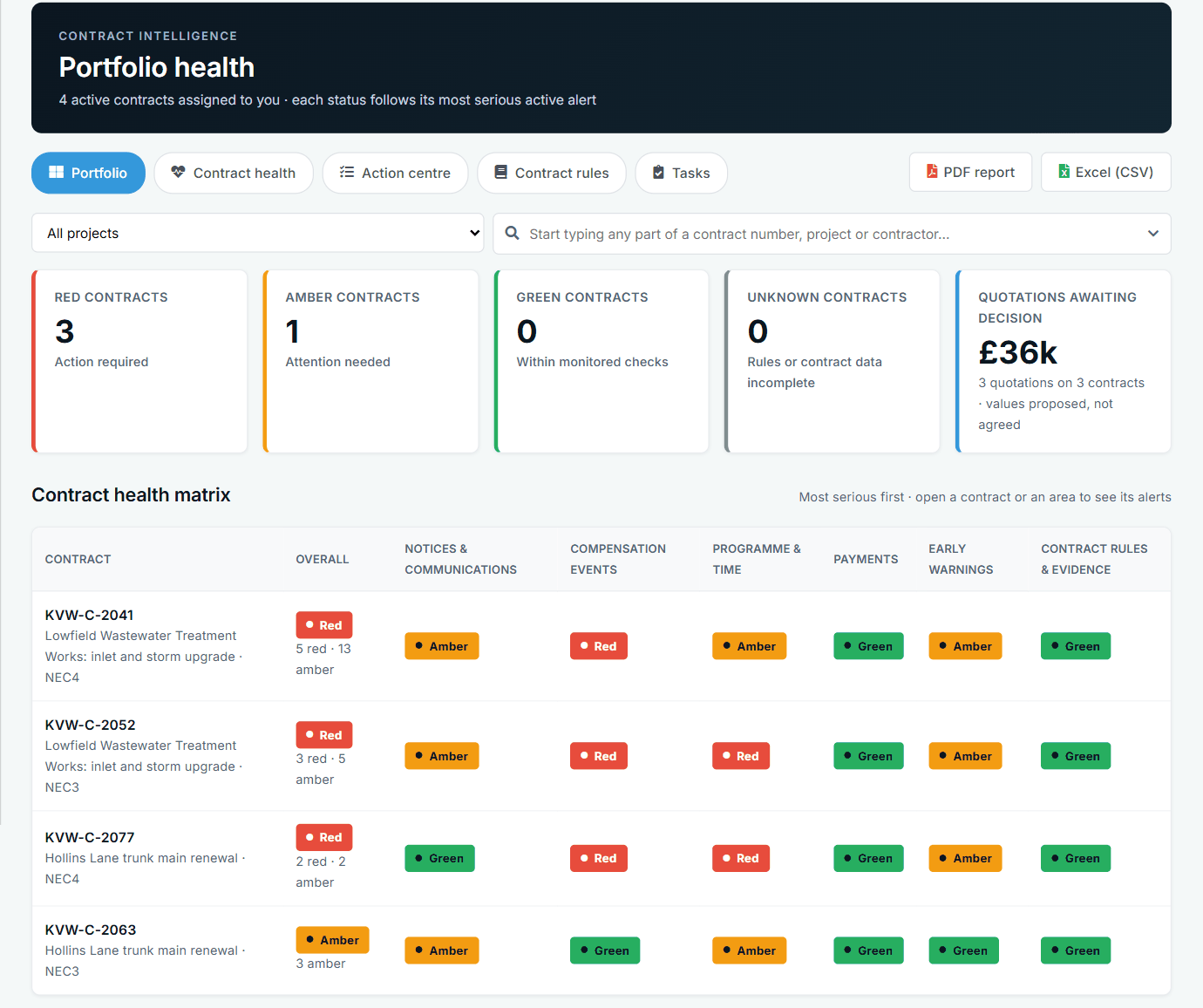
Portfolio health across contracts, by area. See the worked example.
See how this works in practice
Click through Contract Status with sample contracts: raise the notice, reply to it, and watch both sides of one record.
Take the guided tour Book a demo
Test your NEC knowledge, use the free NEC tools or download free NEC templates.
This guide is general information in our own words, not legal advice. Your contract and its Contract Data always govern. NEC, NEC3 and NEC4 are trade marks of Thomas Telford Ltd; Contract Status is not affiliated with or endorsed by NEC.