
NEC programme software tracks the approval of the programme, not the planning of it. You build the programme in your planning tool as before; the contract system records each submission, the Project Manager's answer and its date, and shows which version is the Accepted Programme today.
That is worth doing properly, because compensation events are assessed against the Accepted Programme. If nobody can say quickly which programme that is, every assessment starts with an argument. This page looks at what to check and what Contract Status does. For the wider picture see the NEC contract management software guide, and for the contract see the NEC programme guide.
What the system has to get right
| Rule | Standard ECC | What the software should do |
|---|---|---|
| Reply to a programme | Accept, or give reasons, within 2 weeks of submission (31.3) | Start the clock on submission and put the reply on the Project Manager side's list |
| Reasons for not accepting | Four reasons in the ECC (31.3) | Make the reason a required choice, and flag any reason outside the four |
| Other reasons | Withholding acceptance for a reason the contract doesn't give is a compensation event (60.1(9)) | Show this before the choice is confirmed |
| No reply | A late reply is a compensation event (60.1(6)). In NEC4 only, after a failure notice, the programme is treated as accepted after a further week (31.3) | Apply the rule by edition: NEC3 has no deemed acceptance |
| Revised programmes | When instructed, and at the intervals in the Contract Data (32.2) | Track the next one due, from that contract's own interval |
The first row is the ECC. The NEC4 ECS gives the Contractor three weeks to answer a Subcontractor's programme, not two, so a system with a fixed period will be wrong on subcontracts. See deemed acceptance under NEC4 for how the late reply rule works in practice.
What Contract Status does
- Submit. The Contractor side uploads the programme files with the planned Completion date and submits it.
- Accept or not. The Project Manager side chooses Accepted, or Withhold Acceptance with one of the reasons the contract gives and the date the revised programme is due.
- Set the first one. The first accepted programme is marked as such, so reports measure from it.
- Ask for a revision. The Project Manager side can instruct a revised programme at any time, with the date it is due.
- Late replies on NEC4. When the reply is overdue the Contractor side sees the option to give notice that it is late. A week later, either side can record the deemed acceptance. On NEC3 contracts this option isn't offered as there is no such rule, and it isn't offered on the NEC4 Professional Service Short Contract either.
It records the submission and the answer. Whether the programme shows what the contract requires, such as float, time risk allowances and the dates the Contractor needs access and information, remains for your planner and Project Manager to judge. The clause 31.2 contents guide covers that list.
Four questions that show a weak system
- Which programme applied on a past date? Pick a date six months ago. You should be able to find the Accepted Programme in force then, because that is what a compensation event from that time is measured against.
- What happens to the old one when a revision is rejected? The last accepted version should stay as the Accepted Programme. A system showing only "latest upload" gets this wrong.
- Can it hold your file types? Ask about native planning files as well as PDFs, since a planner will need more than a picture of the bars.
- Where are the reasons kept? They should be on the record with the date, not in a covering e-mail. If acceptance was withheld, the Contractor needs them in order to resubmit, and both sides may need them if a 60.1(9) event is later raised.
A worked example
A fictional NEC4 contract for a school extension, with illustrative dates and standard periods. The Contractor submits Revision 4 on 2 March. The Project Manager's reply is due by 16 March. On 18 March nothing has come back, so the record shows Overdue, and the Contractor gives notice that the reply is late. Revision 4 is treated as accepted once the further week has passed with no answer, on 25 March.
A quotation for a compensation event starting on 27 March is therefore measured against Revision 4, not Revision 3. Had the same facts arisen under NEC3, Revision 3 would remain the Accepted Programme. The late reply would be a matter for a compensation event instead. A team that can't see this date risks pricing the quotation against the wrong programme.
If you want to walk through your own programme cycle with its contract intervals, book a call. For the rule itself, see acceptance and reasons for not accepting.
Related guides
- NEC Contract Management Software
- NEC Payment Application Software
- NEC4 Contract Software
- NEC3 Contract Software
- Compensation Event Software
- Early Warning Register Software
How this looks in Contract Status
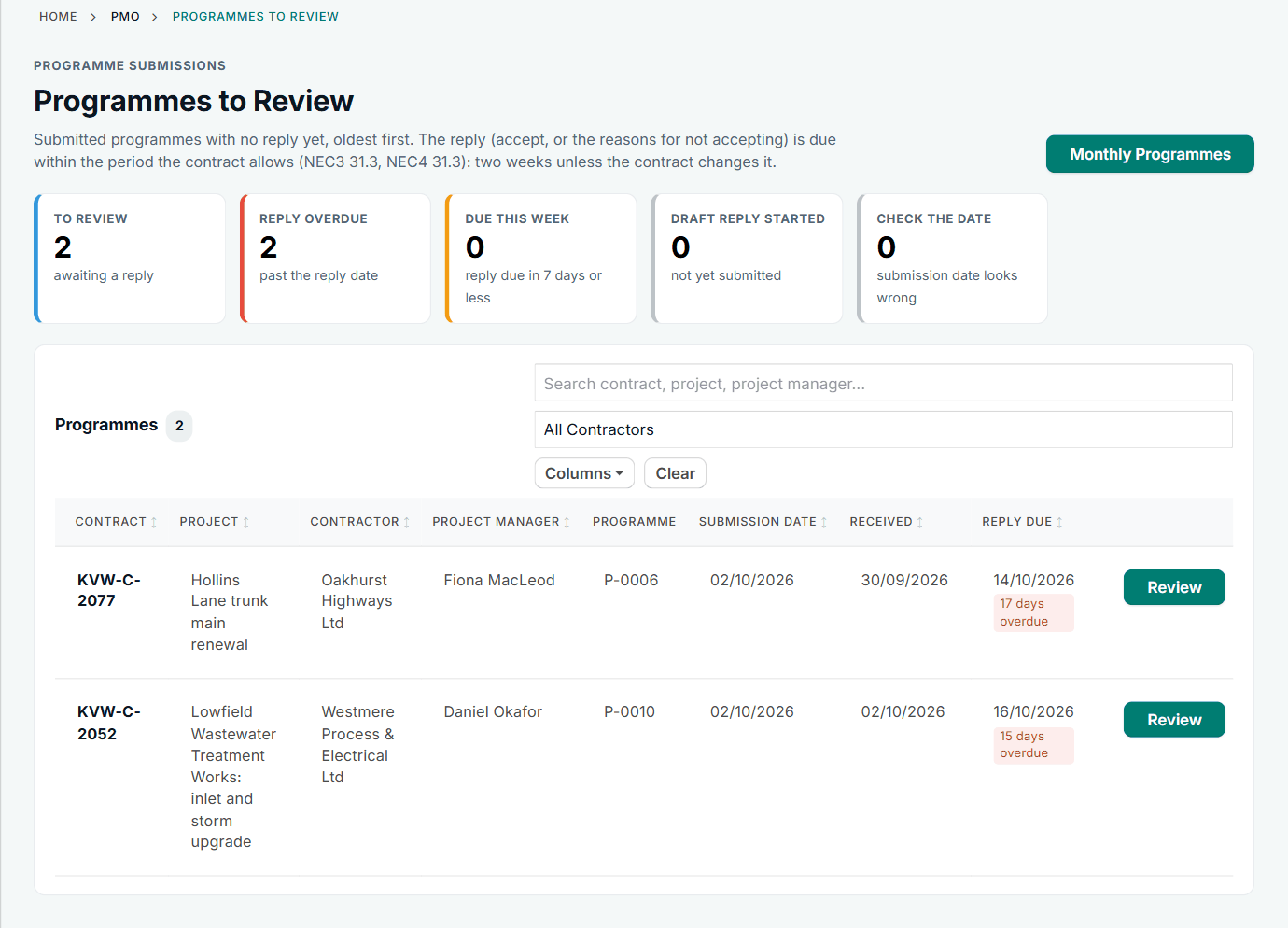
Programmes to Review, with the reply date for each. See the worked example.
See how this works in practice
Click through Contract Status with sample contracts: raise the notice, reply to it, and watch both sides of one record.
Take the guided tour Book a demo
Test your NEC knowledge, use the free NEC tools or download free NEC templates.
This guide is general information in our own words, not legal advice. Your contract and its Contract Data always govern. NEC, NEC3 and NEC4 are trade marks of Thomas Telford Ltd; Contract Status is not affiliated with or endorsed by NEC.