
Contractors use NEC software to protect two things: entitlement, which depends on notifying on time, and cash, which depends on events reaching implementation. NEC software for contractors earns its keep by showing where each event has stalled on its way from site to payment.
The contract gives a Contractor a clear route to be paid for change, but the route has conditions, and a missed condition is usually the Contractor's loss. This page follows that route under the NEC4 ECC. It forms part of the NEC contract management software guide, and NEC for contractors covers the practice more widely.
The route from site to cash, and where it leaks
| Stage | Rule | The usual leak | What to track |
|---|---|---|---|
| Something happens | Early warning as soon as aware (15.1) | "We'll sort it out on site." If an experienced contractor could have warned, the event is assessed as if it had (61.5) | Warnings raised, with dates |
| Notify | Within 8 weeks of becoming aware (61.3) | Waiting for the cost to be known | Awareness date, separately from notice date |
| Reply | 1 week for the Project Manager (61.4) | Silence, and nobody decides whether to give a failure notice | Reply dates passed, and your decision on each |
| Quote | 3 weeks from the instruction (62.3) | Quoting late, so the Project Manager may assess instead (64.1) | Your own due dates, as strictly as theirs |
| Quotation contents | Prices, delay and the workings (62.2) | Quoting the money and forgetting the time | Whether the delay has been measured against the Accepted Programme |
| Implement | Clause 66 (NEC3 clause 65) | Quotations sitting unanswered for months | Age of open quotations |
| Apply for payment | Before the assessment date (50.2) | Applying late. The Project Manager still assesses, but the amount due is then the lesser of that assessment and the previous amount due (50.4) | Next assessment date, and what's going into the application |
Why unimplemented events hurt cash
On Options A and B, a compensation event changes the Prices only when it is implemented. Until then, you've done the work and funded it, and the amount isn't in the Prices you are being paid against. So your unimplemented total is a good rough measure of what you are carrying.
Here is a fictional Option A job with illustrative figures. Five events are in hand: two implemented for £60,000, one with a quotation for £35,000 unanswered for seven weeks, and two notified with work well under way, which you estimate at £48,000. The working figure is:
- Agreed and in the Prices: £60,000
- Done or under way, and not yet in the Prices: £35,000 + £48,000 = £83,000
The action this points to isn't more software. It is a call about the seven-week quotation, and a decision about the failure notice. But you can't act on a figure you can't see. On Options C, D and E the mechanism differs, because Defined Cost is paid as it is incurred, subject to the records. There the event's effect on the target, where there is one, and on the Completion Date is the thing to watch. See compensation events on Option C.
Records you will be asked for
A quotation for a compensation event is worked out from Defined Cost and the Fee (clause 63). Under NEC4, work done before the dividing date is based on what it actually cost, and work after it on what it's forecast to cost (63.1). So even on a lump-sum Option A job you need records for event work. On Options C, D and E, the requirement goes further: clause 52 sets out the records to keep, the Project Manager may inspect them, and cost that the records can't justify can become Disallowed Cost. See Disallowed Cost.
A contract system doesn't normally replace your cost ledger. Contract Status doesn't: it holds the quotation with its build-up, but the cost records stay yours. Look for a clean way of connecting the two, even if that's just a consistent event reference on allocation sheets and invoices.
Getting site to play its part
The early part of the route belongs to people who don't think of themselves as commercial. Your supervisors decide, without realising, when the Contractor became aware. So pick something that's easy for them. In practice that means:
- A way to record an event or an early warning on a phone in less time than it takes to explain why not.
- A rule that recording something doesn't commit anyone to claiming for it.
- A surveyor who looks at new entries daily and decides what goes further.
- Feedback, so that the supervisor who raised it hears what happened. Otherwise they stop.
Ask any supplier how the site route works in practice, and try it with a supervisor rather than a surveyor.
The limits
- Good dates won't turn a weak event into a good one. The Project Manager can still reject it on the grounds in 61.4.
- A system can show you a failure notice is available. Using one is a commercial decision about the relationship as well as the contract, and in Contract Status it is always left to you.
- If the Client's team runs the system and you don't have your own view of it, keep your own list of what you've sent and when.
- Where your own subcontractors are involved, the dates interact: see subcontract management software and avoiding missed time bars.
Related guides
- NEC Contract Management Software
- Why Clients Use NEC Contract Software
- Why Quantity Surveyors Use NEC Contract Software
- Why Subcontractors Use NEC Contract Software
- Seeing Your NEC Commercial Position at a Glance
- Why NEC Project Managers Use Contract Software
How this looks in Contract Status
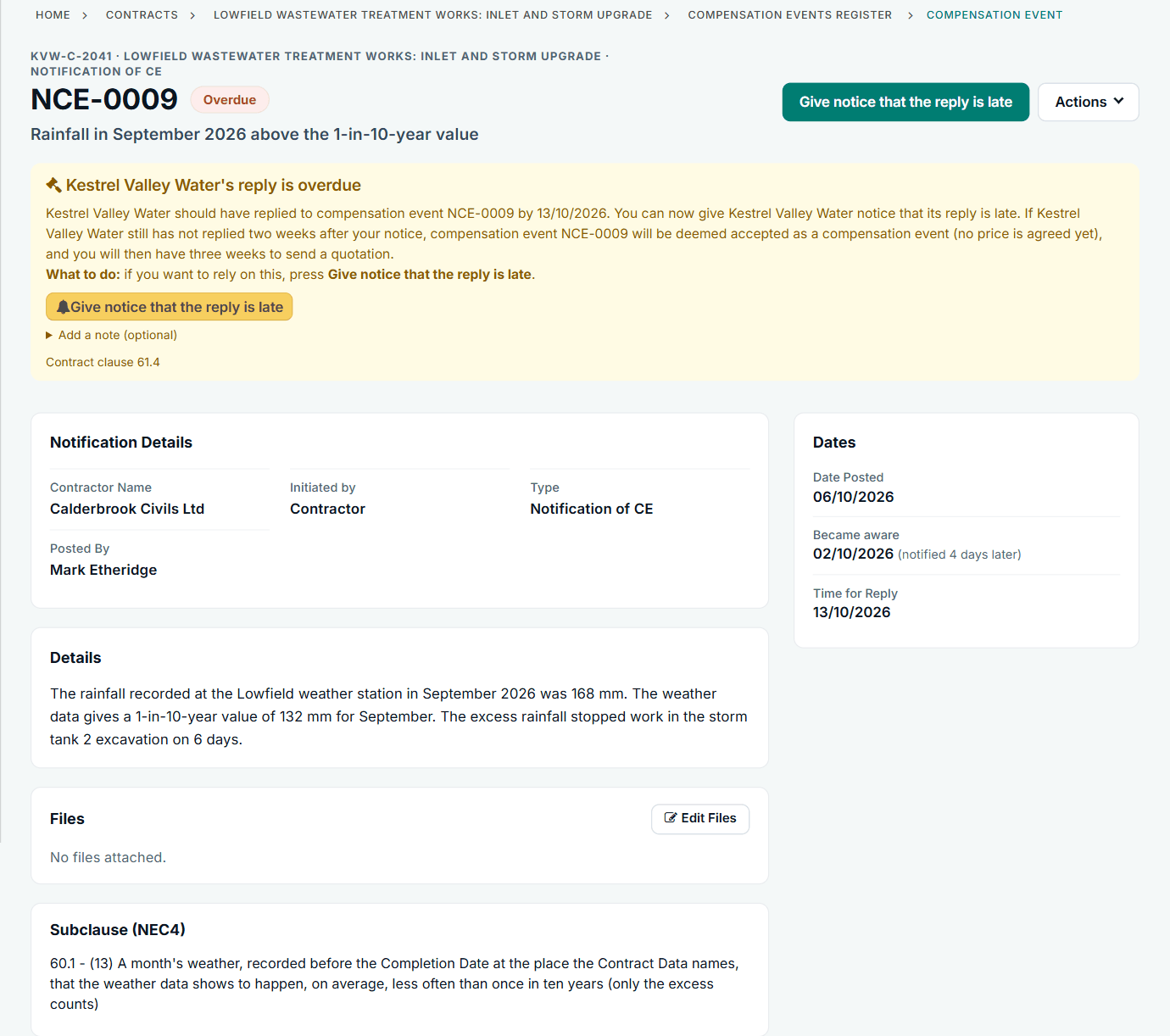
A late reply in Contract Status: the banner, the clause and the button for the notice. See the worked example.
See how this works in practice
Click through Contract Status with sample contracts: raise the notice, reply to it, and watch both sides of one record.
Take the guided tour Book a demo
Test your NEC knowledge, use the free NEC tools or download free NEC templates.
This guide is general information in our own words, not legal advice. Your contract and its Contract Data always govern. NEC, NEC3 and NEC4 are trade marks of Thomas Telford Ltd; Contract Status is not affiliated with or endorsed by NEC.