
Project Managers use NEC software because the role is measured in replies. Under the ECC, nearly every process waits on the Project Manager at some point, and a late answer usually has a contract effect, so NEC software for project managers is mainly about keeping that load visible.
A Project Manager's mistakes in this area also don't stay private. They can change the Prices and the Completion Date for the Client they are acting for. This page looks at the workload, for the NEC4 ECC with NEC3 notes. It sits within the NEC contract management software guide, and the role itself is covered in Project Manager responsibilities.
What lands on the desk
| Item | Standard ECC period | If it's late or wrong |
|---|---|---|
| Contractor's notification of a compensation event | Reply in 1 week (61.4) | Failure notice, then treated as accepted after 2 more weeks |
| Quotation | Reply in 2 weeks (62.3) | Failure notice, then treated as accepted after 2 more weeks (62.6) |
| Own assessment | The time allowed for a quotation (64.3) | Failure notice, then the quotation is treated as accepted (64.4) |
| Programme for acceptance | Accept, or give reasons, in 2 weeks (31.3) | A compensation event (60.1(6)); NEC4 can also treat it as accepted |
| Other submissions and questions | The period for reply (13.3) | A compensation event (60.1(6)), subject to its conditions |
| Early Warning Register | Issue revised within 1 week of each meeting (15.4); NEC3 has no fixed time | The register goes stale, and instructions that decisions need don't get issued |
| Payment certificate | Within 1 week of each assessment date (51.1) | Payment and notice problems, including under the Construction Act |
| Completion | Certify within 1 week of Completion (30.2) | Delay damages and take over dates become arguable |
Change the periods to match your Contract Data and any Z clauses. Then add the things you start yourself: an instruction under 14.3 that is also a compensation event needs notifying at the same time, with the instruction to quote (61.1 in NEC3; 61.1 and 61.2 in NEC4).
What makes the role hard to track
A Project Manager often covers more than one contract and depends on others for each answer. The reply to a quotation may need a surveyor's view, a designer's check and a Client decision. The date belongs to the Project Manager. The work belongs to three other people, who may not know about the date. That is why a list of due dates, on its own, solves only part of it.
A short test for any system: can a reviewer's or a delegate's work be seen against the reply date, or does the Project Manager have to ring round?
Where a system tends to help most
- The list of what's waiting. A single list, most urgent first, across the items above. In Contract Status this is the Action List, with My Dashboard showing the same at a glance.
- Extensions on the record. A period can be extended only by agreement before the reply is due (13.5, 61.4, 62.5). When the agreement is on the record, the new date replaces the old one for that item alone.
- Keeping the reason with the reply. A reason for withholding acceptance needs to be one the contract allows, or it is a compensation event (60.1(9)). The reasons for rejecting a notified event should be next to the event.
- Finding the last decision. When a matter comes back, you need to know what was said, without relying on your own memory or your predecessor's.
- Letters. Routine notices shouldn't take long to produce, so long as someone reads them before they go.
Delegation and cover
Clause 14.2 lets the Project Manager delegate actions after notifying the Contractor, and on any large job this has to happen. The risk is the informal version, where a colleague answers some things and it isn't clear who holds what. When someone is on leave, the periods keep running. Before you buy anything, make sure of three things: delegation is notified, the cover is named, and failure notices go to a person rather than a shared folder. There is more on this in avoiding treated acceptance.
What a system won't do for you
- Make the decision. Whether the event is a compensation event, and what it is worth, stays with you, and so does acting as the contract says, in mutual trust and co-operation.
- Read the programme. Accepting one without reading it creates a baseline you'll regret.
- Replace a conversation. A lot of good project management happens before the formal notice goes.
- Make a late reply better than a poor one. Answering on time with reasons you can't support may simply move the argument. If you need more time, ask early.
A weekly routine that fits on one page
- Monday: go through what is waiting on your side, due date first, and give each a person.
- Midweek: check on replies falling due this week that depend on someone else.
- Before each early warning meeting: review open actions on the register.
- After each meeting: issue the revised register, and give any instruction the decisions need.
- Friday: check for any failure notices, and for next week's assessment date.
The steps work with any tool, and the weekly NEC routine goes further. A system's job is to make the first step take minutes.
Related guides
- NEC Contract Management Software
- Why Contractors Use NEC Contract Software
- Why Clients Use NEC Contract Software
- Why Quantity Surveyors Use NEC Contract Software
- Why Email Is a Poor Way to Run an NEC Contract
- Seeing Your NEC Commercial Position at a Glance
How this looks in Contract Status
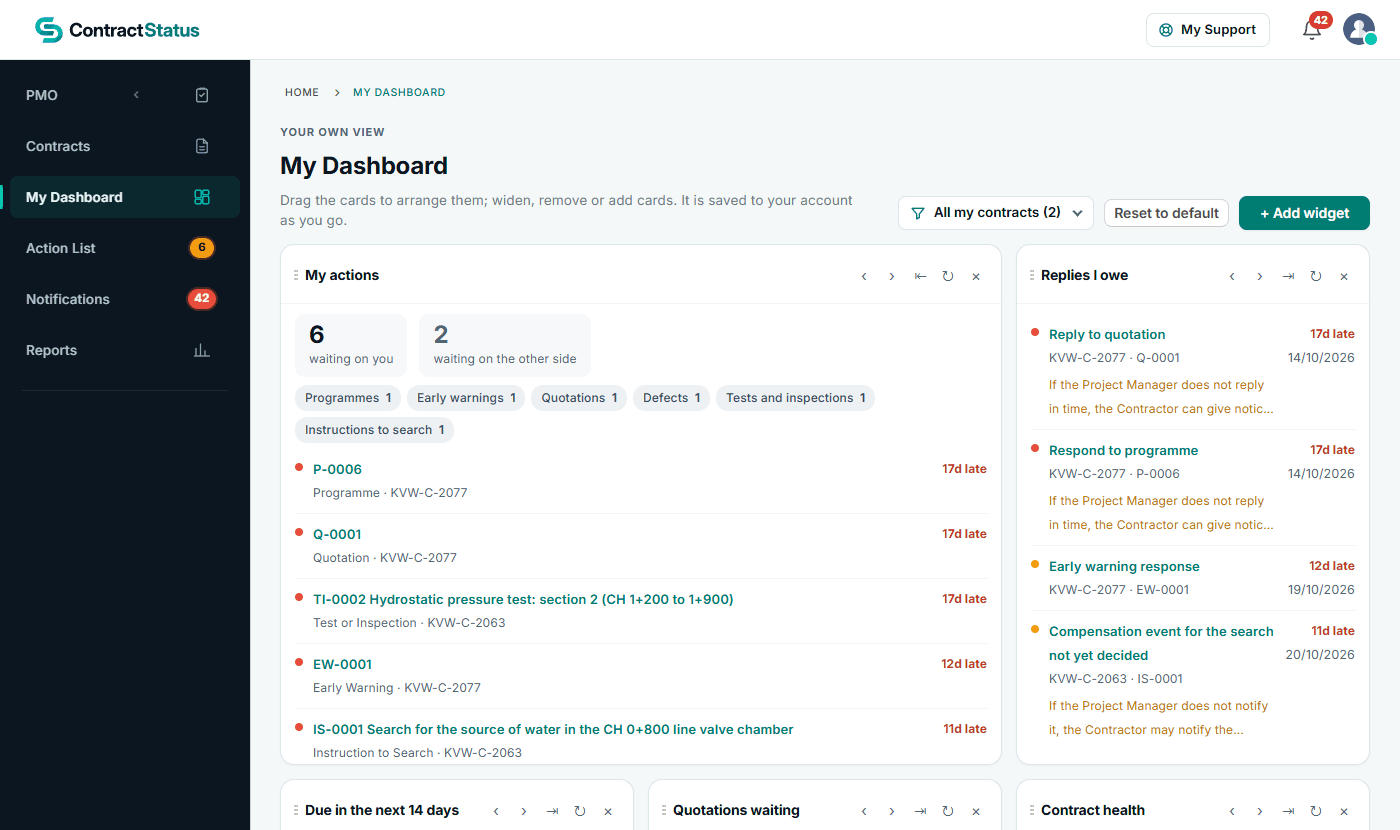
My Dashboard: what is waiting on you and which replies you owe. See the worked example.
See how this works in practice
Click through Contract Status with sample contracts: raise the notice, reply to it, and watch both sides of one record.
Take the guided tour Book a demo
Test your NEC knowledge, use the free NEC tools or download free NEC templates.
This guide is general information in our own words, not legal advice. Your contract and its Contract Data always govern. NEC, NEC3 and NEC4 are trade marks of Thomas Telford Ltd; Contract Status is not affiliated with or endorsed by NEC.