
No, not on its own. A site instruction from the Client isn't a valid NEC instruction unless the Project Manager has delegated that action to them and told you, because clause 14.3 gives the power to change the Scope to the Project Manager and clause 27.3 ties your duty to obey to the Project Manager and Supervisor.
So the deciding fact is role, not seniority. A Client's director outranks the Project Manager in every way except the one the contract cares about. If you act and the Project Manager doesn't back it up, you may have done unpaid work. This answer is part of our NEC questions series; the numbers are the same in NEC3, where the Client is called the Employer.
Who said it, and what it means
| Speaker | Can they change the Scope? | Your next move |
|---|---|---|
| Project Manager | Yes, but it needs to be in recordable form (13.1) | Ask for it in writing |
| Delegate you've been notified of | Yes, within the delegated actions (14.2) | Check the notice covers this, then as above |
| Supervisor | No. Its powers are about tests and Defects. See the Supervisor's role | Refer to the Project Manager |
| Client or Client's representative | No, unless delegated and notified | Refer to the Project Manager |
| Client's designer or end user | No | Refer to the Project Manager |
On the day
- Be polite and clear. "We'd be glad to look at that. It needs to come from the Project Manager so it's covered properly."
- Don't start the change. Unless safety needs it, keep to the Scope.
- Write to the Project Manager today. Say who asked for what, why you haven't acted, and when you need a decision to avoid any effect.
- Warn if it could affect time or money. A request from the Client for a change you can't yet act on can itself be a matter for early warning.
- Tell your site team. Foremen get these requests first. The people who have to say "ask the Project Manager" need to know that they should.
If you've already done it
It happens. Take these steps now:
- Notify a compensation event under clause 61.3, within eight weeks of awareness. Don't assume the exemption for instructions will protect you, since it covers instructions from the Project Manager or Supervisor.
- Ask the Project Manager to issue an instruction now, recording the change. Say that the work has been done and give the date.
- Gather the proof: who asked, photos, labour and plant records. Any Client email is especially useful.
- If the Project Manager refuses, the work might be a Defect. Ask whether it's being accepted as it stands or if you're being told to reverse it. Either answer tells you where you stand.
Other events could fit, depending on the facts. A Client that physically interferes with your work could be working outside the conditions in the Scope (60.1(5)), and a breach by the Client may fall under 60.1(18). These are arguments for your adviser, not a plan.
What you'll probably hear
- From the Client: "It's our building, and we're paying." True, and the Project Manager can almost certainly give the instruction within the hour if they agree. That's a better outcome for the Client as well, because the cost is then visible.
- From the Project Manager: "I didn't authorise that; you should have checked." The contract supports them here. It's why step 3 is the same day.
- From your own director: "Don't upset the Client." Understood, but you aren't refusing. You are making sure they get what they want, and that it's recorded and priced.
Sample note to the Project Manager
If this keeps happening, it's a job-level problem, not a one-off. See the Client keeps instructing directly. The limits of the role are explained under the Client.
Related guides
- NEC Questions Answered: Real Situations on Site
- The Client Keeps Instructing the Contractor Directly: What Should We Do?
- The PM Issued an Instruction but No Compensation Event: What Now?
- We Missed the Eight-Week Time Bar: Is It Over?
- The Project Manager Replied Late: Is It Automatically a Compensation Event?
- Can We Carry On Without a Written Instruction?
How this looks in Contract Status
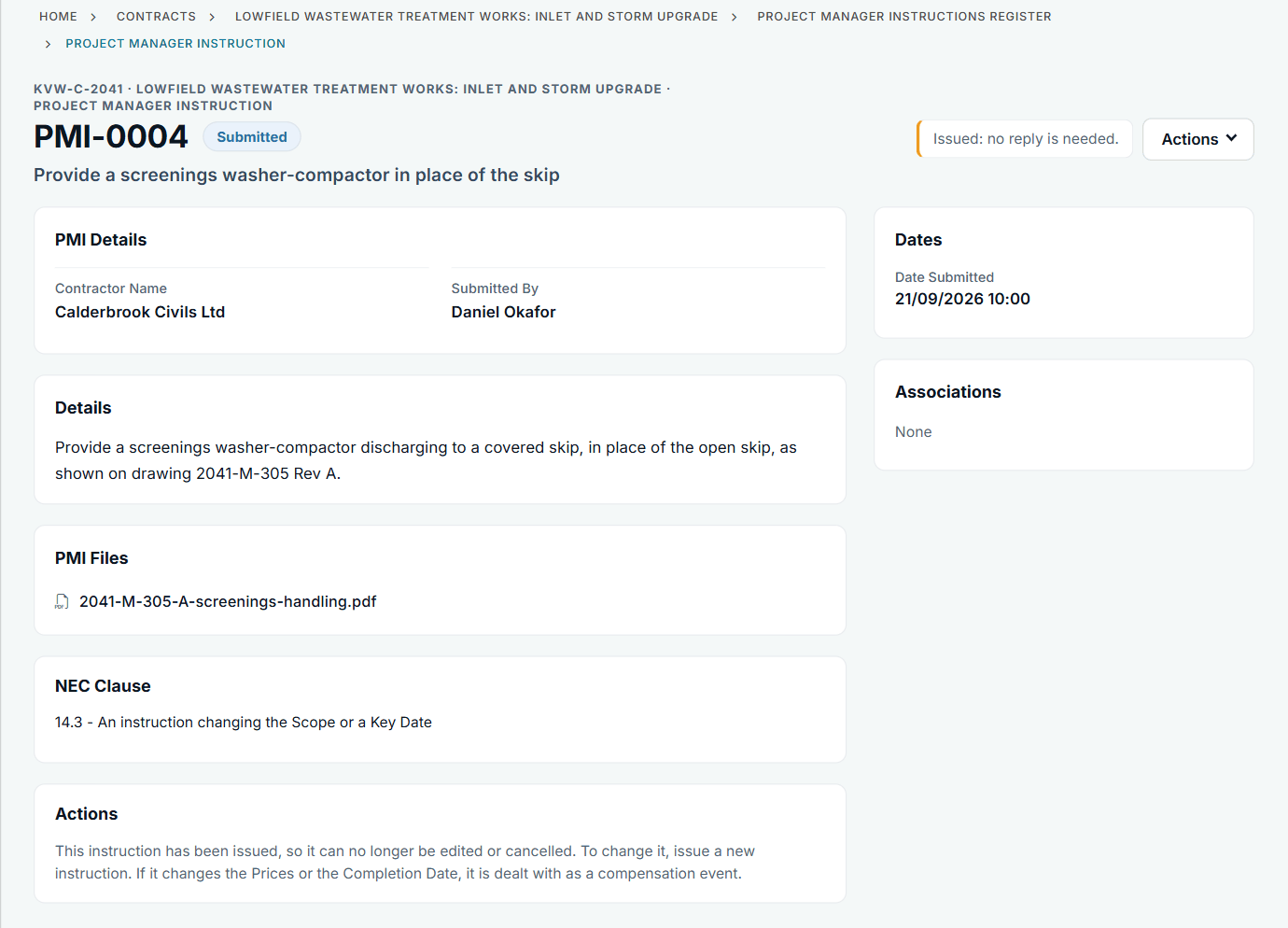
An issued instruction with its file and clause. See the worked example.
See how this works in practice
Click through Contract Status with sample contracts: raise the notice, reply to it, and watch both sides of one record.
Take the guided tour Book a demo
Use the NEC deadline calculator, use the free NEC tools or download free NEC templates.
This guide is general information in our own words, not legal advice. Your contract and its Contract Data always govern. NEC, NEC3 and NEC4 are trade marks of Thomas Telford Ltd; Contract Status is not affiliated with or endorsed by NEC.