
Yes, it is normally a compensation event. When the Supervisor instructs a search for a Defect and none is found, clause 60.1(10) applies in both NEC3 and NEC4 ECC, so a search with no defect found changes the Prices and possibly the Completion Date.
One exception decides most arguments: there's no event if the search was needed only because you gave too little notice of work that blocked a required test or inspection. The instruction itself is at 43.1 in NEC4 (42.1 in NEC3), and our guide to searching for Defects explains how it works.
What to do, in order
- Comply. Open up the work. A dispute about the reason doesn't justify refusing the instruction.
- Check the reason was given. The Supervisor states one with the instruction. If it hasn't, ask for it in writing the same day.
- Record before you break anything: photographs, the labour and plant used, materials wasted, and what happens to following trades.
- Invite the Supervisor to witness the opening up and agree the finding on site, ideally the same day.
- Notify the compensation event straight away if the Project Manager hasn't. See the timing point below.
- Put the work back and quote. Quotations are due within three weeks of the instruction to submit them (two weeks in the NEC4 subcontract).
The timing point
The contract says that events arising from an instruction fall outside the eight-week bar in clause 61.3. A search instruction is exactly that, so a late notification here shouldn't lose you the event. In practice, don't rely on that. Notify once the result is known, because the Project Manager may not realise that an instruction from the Supervisor has become an event, and old claims are harder to evidence.
The result also matters for assessment. Under NEC4, the dividing date for an event arising from an instruction is the date of the communication, so cost incurred after it is judged as a forecast of what would happen at that date, and earlier cost at actual Defined Cost. Your records of the search let you test that forecast.
How the facts change the answer
| What happened | Likely position |
|---|---|
| Search instructed, work opened, all compliant | Compensation event under 60.1(10) |
| A Defect was found | No event. The Contractor corrects it and carries the search on the basis its main Option gives |
| You poured over a required inspection point without proper notice under 41.3, and it was opened to allow the check | The exception applies: no event, even if the work is sound |
| You gave notice, and the Supervisor missed the inspection | The exception doesn't obviously apply; you gave what the contract asked. 60.1(11) may also be relevant if the delay was unnecessary |
| Many areas opened and a Defect in one | Expect argument. Record each area separately and keep your costs apart, so that the sound areas can be priced on their own |
What goes in the quotation
Include breaking out, disposal, making good and reinstating finishes. Add testing the instruction required beyond the Scope, standing time for gangs held up, and resequencing of following work. If planned Completion moves on the programme, the delay belongs in the quotation too, measured under 63.5 of NEC4 (63.3 in NEC3). The test delay guide covers the neighbouring event.
Sample notification
"We notify a compensation event under clause 60.1(10). On [date] the Supervisor instructed a search under clause 43.1 at [location], for the stated reason of [reason]. The work was opened on [date], witnessed by [name]. No Defect was found. Notice of this work was given under clause 41.3 on [date]. We await your instruction to submit quotations."
The likely reply
The Project Manager will probably test three things: whether your 41.3 notice was given in time, whether the opening up found anything at all, and whether the quantity of work was reasonable. The last point can be overdone. The Supervisor decided the search area, so you shouldn't be marked down for doing what it instructed. If the reply is that nothing changes, you can dispute it. Other problems of this kind are listed in the NEC questions hub.
Related guides
- NEC Questions Answered: Real Situations on Site
- The PM Wants a Member of Our Team Removed: Can They?
- We Need to Replace a Key Person: What Is Required?
- Do We Need the PM's Acceptance to Appoint a Subcontractor?
- The Supervisor Says the Work Is Defective but We Disagree
- A Test Failed: Who Pays for Retesting?
How this looks in Contract Status
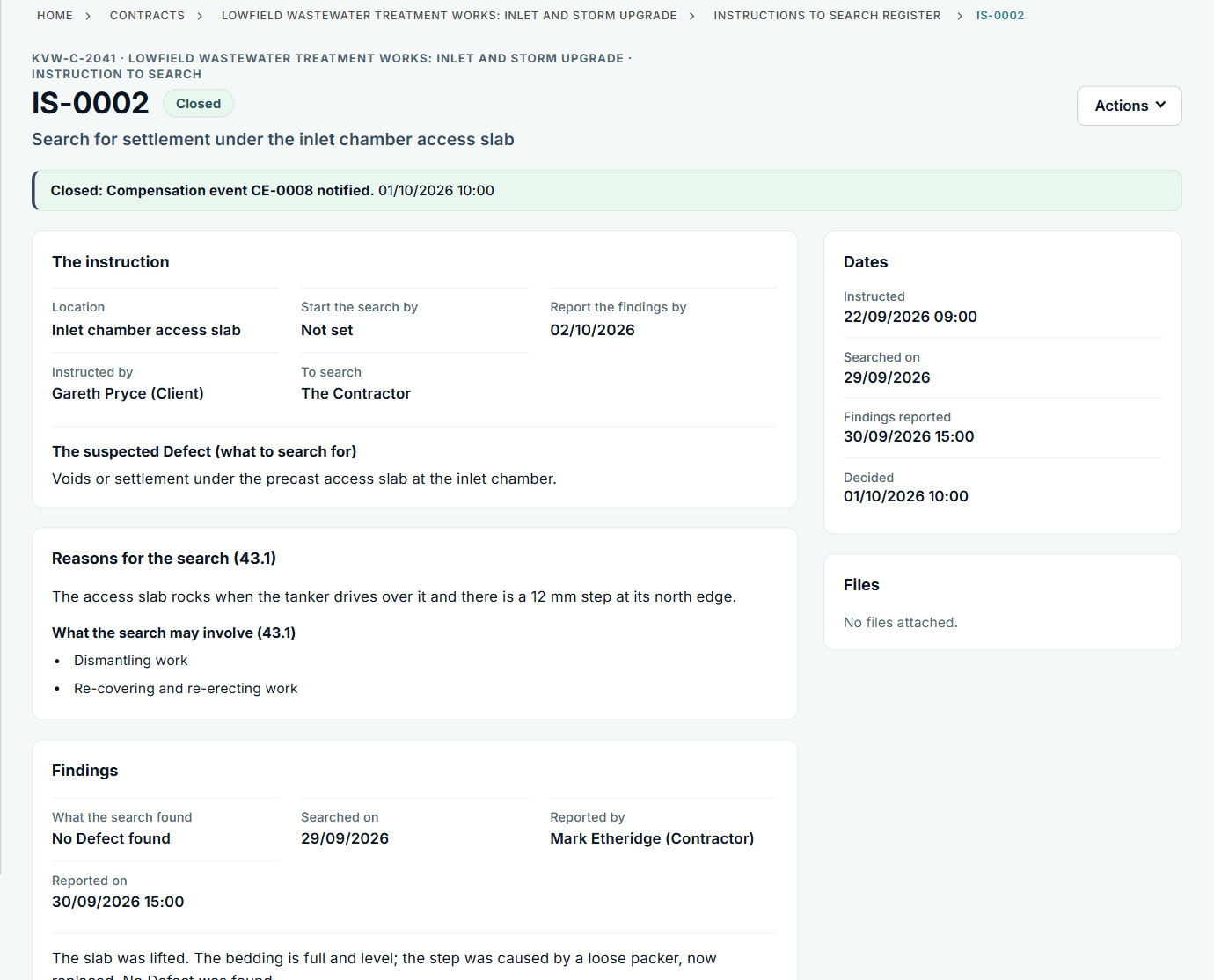
An instruction to search with its reasons and findings. See the worked example.
See how this works in practice
Click through Contract Status with sample contracts: raise the notice, reply to it, and watch both sides of one record.
Take the guided tour Book a demo
Use the NEC deadline calculator, use the free NEC tools or download free NEC templates.
This guide is general information in our own words, not legal advice. Your contract and its Contract Data always govern. NEC, NEC3 and NEC4 are trade marks of Thomas Telford Ltd; Contract Status is not affiliated with or endorsed by NEC.